Projects start with clear goals, but without proper planning, deadlines can shift, priorities may change, and teams can lose track of progress. This is why a structured Project Timeline is important for keeping tasks organized, improving accountability and ensuring projects stay on schedule.
It gives teams clear visibility into tasks, milestones, dependencies, and deadlines, making Project Management more organized and efficient. In this blog, you will learn about what is Project Timeline, why it matters, its different types, how to create one, and more. Let's begin!
Table of Contents
1) What is a Project Timeline?
2) Importance of Project Timelines
3) Components in Planning Project Timeline
4) Types of Project Timelines
5) How to Create a Project Timeline?
6) Benefits of a Project Timeline
7) Examples of Project Timelines
8) Best Practices for Project Timeline
9) Conclusion
What is a Project Timeline?
A Project Timeline is a Project Management tool used to organize and display project tasks in chronological order. It gives a clear visual overview of tasks, milestones, deadlines, and dependencies, helping teams track progress and manage project activities more effectively.
A Project Timeline outlines the start and end dates of tasks while showing which activities are completed, in progress, or pending. By visualizing the entire project schedule in one place, it helps teams stay organized, avoid delays, and ensure projects are completed on time.

Importance of Project Timelines
Project Timelines are important because they maintain structure, organization, and clarity throughout the project lifecycle. Without a clear timeline, teams may miss tasks, lose track of deadlines, and struggle to manage work. A well-planned timeline helps teams stay aligned with project goals while allowing Project Managers to monitor progress more effectively.
Also, Project Timelines break large projects into smaller and manageable phases, reducing confusion and preventing scope creep. By planning tasks and deadlines in advance, teams can identify potential risks, bottlenecks, and resource issues early, helping projects stay on track and avoid delays.
Components in Planning Project Timeline
Creating an effective Project Timeline involves several important components that help organize tasks, structure workflows, and maintain clear deadlines throughout the project lifecycle. Let's look at the key components involved in planning a Project Timeline:
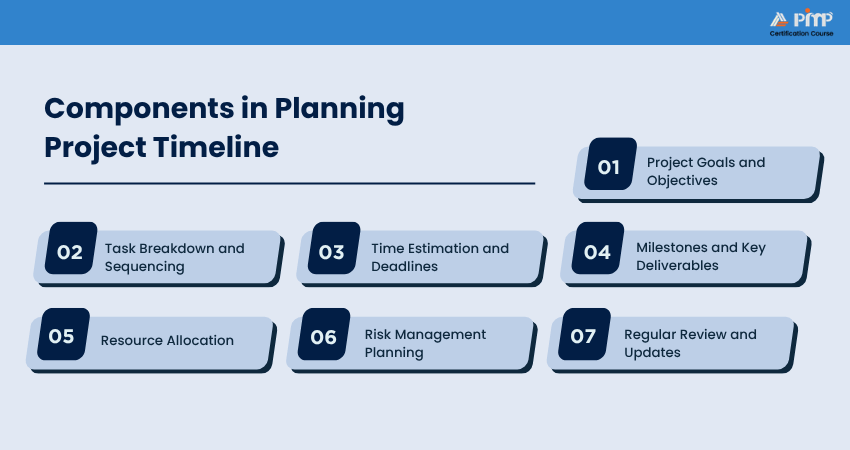
1) Project Goals and Objectives
Project goals define the desired outcomes, while objectives outline the measurable steps required to achieve them. Clearly defining these elements helps teams prioritize tasks and align the timeline with the overall project purpose.
2) Task Breakdown and Sequencing
Breaking the project into smaller tasks makes planning, assignment, and tracking easier. Proper task sequencing ensures activities follow a logical order, while task dependencies identify which activities must be completed before others can begin.
3) Time Estimation and Deadlines
Estimating the time required for each task helps create realistic schedules and achievable deadlines. Clear deadlines improve accountability, support better scheduling, and help teams complete work within the expected timeframe.
4) Milestones and Key Deliverables
Milestones represent major achievements or project stages, while deliverables are the expected outputs at different phases. Including them in the timeline helps teams measure progress and maintain visibility over critical project outcomes.
5) Resource Allocation
Resource allocation ensures that team members, budgets, tools, and equipment are assigned effectively to project tasks. Proper resource planning helps balance workloads, improve efficiency, and reduce resource conflicts.
6) Risk Management Planning
Risk Management planning helps identify potential issues such as delays, bottlenecks, or resource shortages that may affect the project schedule. Planning contingency actions in advance help minimize disruptions and keep the project on track.
7) Regular Review and Updates
Regularly reviewing and updating the timeline helps teams adapt to changes, manage delays, and maintain accurate project schedules. Also, it ensures stakeholders stay informed and keeps the project aligned with its goals and deadlines.
Types of Project Timelines
Let's check some of the Project Timeline types so that you can check which type suits which projects:
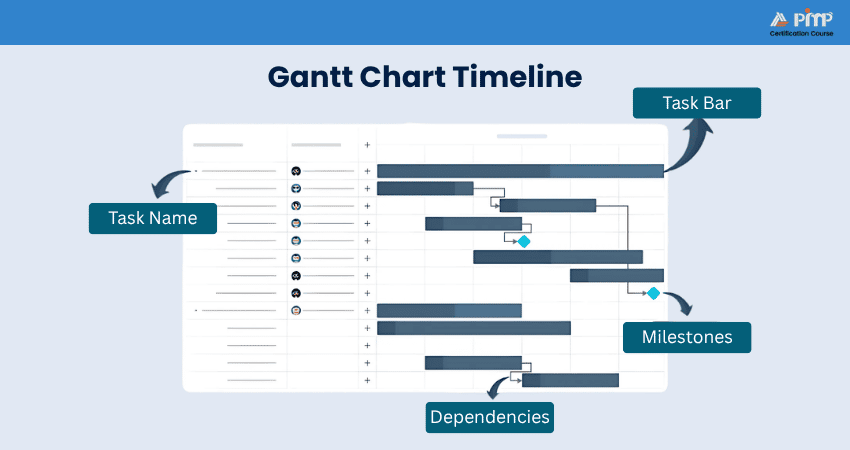
1) Gantt Chart Timeline
A Gantt chart is one of the most popular Project Timelines. It shows tasks as horizontal bars across a timeline. In that, you can see task duration, start and end dates, and overlapping tasks. It's great for tracking long or complex projects.
2) Historical Timeline
The historical timeline shows key events or tasks in a straight line based on dates. It is often used to show past progress or project history, useful in presentations or reports. This type is especially used in educational or retrospective projects.
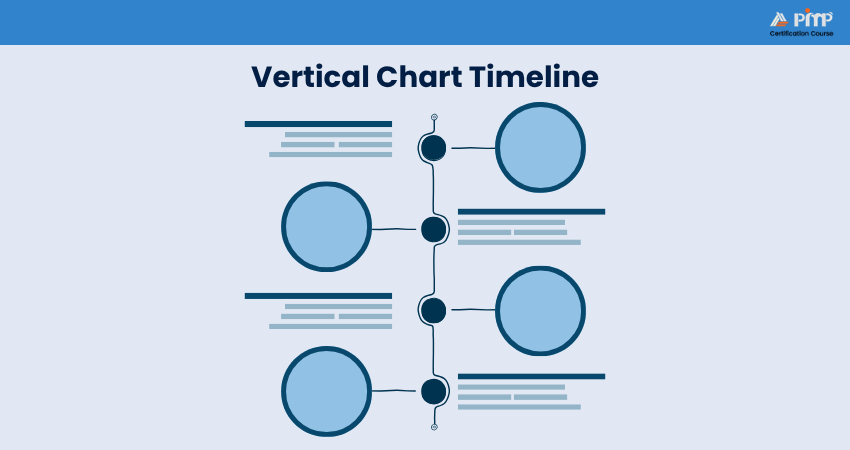
3) Vertical Chart Timeline
This timeline shows key events or tasks in a vertical, straight line based on dates. It is generally used to display past progress or project history, useful in presentations or reports. It's easy to read and works well for short projects.
4) Kanban Timeline
It is inspired by the Kanban Boards. Used in tools like Trello or Jira, a Kanban timeline shows tasks as cards moving through columns such as "To Do," "In Progress," and "Done." It is flexible and suitable for teams that follow Agile or Lean methods.
The Critical Path Method (CPM) method shows the independent tasks that might affect the Project Timeline. It helps you see which tasks cannot be delayed, or the whole project will be late. Overall, you can use this to avoid delays in your project.
6) Program Evaluation and Review Technique (PERT)
PERT is a timeline used for big or complex projects to estimate the time required for each stage in a project. It looks like a flowchart, and it is useful when there is a lot of uncertainty in a project plan.
Learn how to build accurate schedules for complex business projects with the
PMI Scheduling Professional (PMI-SP)® Certification
– Join now!
How to Create a Project Timeline?
A good Project Timeline helps your team stay organized, manage time better, and finish tasks on schedule. Here are the seven steps involved in creating it:
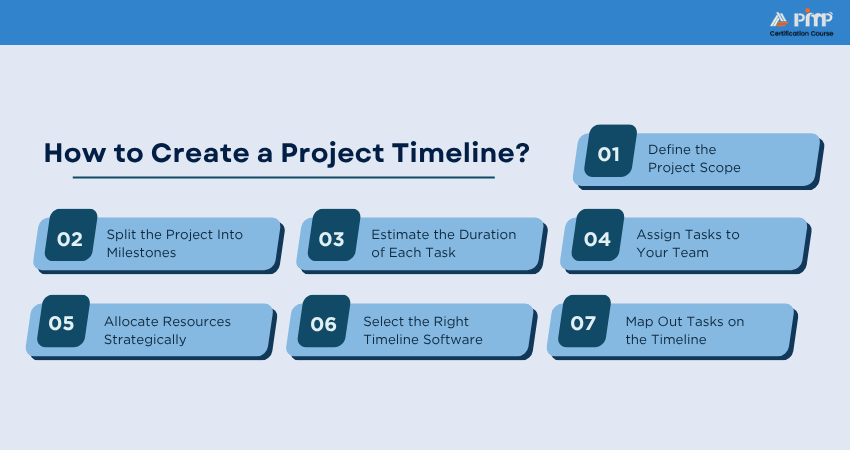
Step 1: Define the Project Scope
Before creating a timeline, you need to understand what your project is about. For that, you can define the main goal, key deliverables, expected results, deadline, and budget limits. Knowing your project's size and goal helps you plan each task properly.
Example:
We will deliver a working model of the mobile app with login, profile, and dashboard features by November 30. This sets clear goals and helps estimate time, team effort, and tools needed.
Step 2: Split the Project Into Milestones
Next, create a Work Breakdown Structure (WBS), which lists everything involved in a project. Convert related tasks into milestones and big checkpoints that show progress.
Example:
Plan your milestones like completing the login system for the app, finishing profile creation steps, or building the dashboard. Each milestone will include multiple smaller tasks that count towards the final delivery.
Step 3: Estimate the Duration of Each Task
Now, you need to figure out how long each task will take. When you break the task into small parts, you can easily find it. This helps you avoid underestimating time and gives a more accurate plan. Tools with built-in time tracking can make this step even easier.
Example:
You can plan one day for login design, three days for backend work, and two days for testing and finalizing the app. By estimating each small task, you can manage your project deadlines effectively.
Step 4: Assign Tasks to Your Team
Now it's time to decide who will do what tasks. So, assigning the right people to the right tasks is key. The factors to consider include skills, workload, and availability. Make sure each team member knows their responsibilities and deadlines.
Example:
If your Backend Developer is stronger with logic than design, let them build the login system, while your Frontend Expert handles the dashboard layout and user experience. This way, each person works on tasks they're confident in, which saves time and improves results.
Step 5: Allocate Resources Strategically
Resources include people, tools, money, and materials. Managing resources is as important as managing tasks. Make sure each task has what it needs to be completed on time. For that, you can check for bottlenecks or overloaded team members.
Example:
The dashboard needs 30 hours, but your Frontend Developer is available for 20 hours only. You can split tasks across two team members and add a 10% buffer for testing the bugs.
This keeps the schedule realistic timeframes that are flexible for every team member.
Step 6: Select the Right Timeline Software
You can use a spreadsheet for creating a Project Timeline, but a Project Timeline software will be much more efficient. It updates tasks, tracks progress, and shows dependencies. There are many tools available, like Microsoft Project, Trello, Monday.com, and GanttPRO, that can help build and manage timelines.
Example:
You can consider using GanttPRO to visualize the project stages like features, dependencies, and checkpoints. A tool helps keep everything updated and visible to the team.
Step 7: Map Out Tasks on the Timeline
Now, you can place all the tasks on your timeline, in the right order. Add start and end dates, dependencies, and team responsibilities. You can also review everything you have planned with your team.
Example:
The login screen will be designed on September 25 to 26, the backend will be built on Sept 27 to 29, the UI will be connected on Sept 30, and the application will be tested on Oct 1.
Do the same for each task. Add deadlines, dependencies, and team names so everyone knows what's next.
Integrate projects effectively and manage interdependencies with our
Program Management Professional (PgMP)® Certification
– Register now!
Benefits of a Project Timeline
It is time for you to check how timelines make your project better. So, here are its benefits:
1) Better Planning and Structure
A Project Timeline provides a clear schedule from the beginning to the end of the project, helping teams organize tasks more effectively. It also supports better resource planning, task scheduling, and progress tracking, ensuring project activities stay structured and manageable.
2) Clearer Communication and Team Coordination
A Project Timeline helps keep team members aligned with shared goals, deadlines, and responsibilities. By improving visibility into project activities, it reduces confusion, minimizes miscommunication, and strengthens collaboration between teams.
3) Optimized Resource Usage
Project Timelines help allocate resources such as team members, budgets, tools, and equipment more efficiently. This prevents overbooking, reduces bottlenecks, and supports smoother Task Management across different project teams.
4) Improved Team Accountability
By assigning clear responsibilities and deadlines, a Project Timeline encourages team members to take ownership of their tasks. This improves accountability, increases motivation, and supports higher productivity throughout the project lifecycle.
5) Risk Mitigation
A Project Timeline helps teams identify task dependencies, possible delays, and potential project risks early. This allows Project Managers to take better proactive actions, manage critical paths effectively, and resolve issues before they escalate.
6) Client Satisfaction
Project Timelines provide clients with better visibility into project progress, milestones, and deadlines. Regular updates and transparent communication help build trust while making it easier to manage expectations and project changes.
7) Informed Decision-making
A Project Timeline provides real-time visibility into project progress, helping Managers make faster and more informed decisions. It also supports better control over schedules, resources, and budgets, ensuring projects remain aligned with business goals.
Discover the skills to manage portfolios effectively with our Portfolio Management Professional (PfMP)® Certification – Sign up soon!
Examples of Project Timeline
Below are a few examples of how Project Timelines can be structured for different types of projects. These examples show how tasks, phases, milestones, deadlines, and dependencies are organized to help teams manage projects more efficiently. Let's look at them below:
1) Project: Developing a New Mobile Application
1. Phase 1:
Project Initiation and Planning (2 Weeks)
a) Task 1:
Gather requirements from stakeholders (3 days)
b) Task 2:
Create the project plan and timeline (2 days)
c) Milestone:
Project plan approval (End of Week 2)
2) Phase 2: Design and Prototyping (4 Weeks)
a) Task 3:
Create wireframes and UI design (2 weeks)
b) Task 4:
Develop the application prototype (2 weeks)
c) Milestone:
Prototype review and approval (End of Month 1)
3) Phase 3: Development (6 Weeks)
a) Task 5:
Develop core application functionality (3 weeks)
b) Task 6:
Implement additional features (2 weeks)
c) Task 7:
Integrate third-party services (1 week)
d) Milestone:
Beta version ready for testing (End of Month 2)
4) Phase 4: Testing and Debugging (4 Weeks)
a) Task 8:
Perform unit testing and resolve bugs (2 weeks)
b) Task 9:
Conduct user acceptance testing (2 weeks)
c) Milestone:
Application passed quality assurance testing (End of Month 3)
5) Phase 5: Launch Preparation and Deployment (2 Weeks)
a) Task 10:
Prepare marketing materials and release notes (1 week)
b) Task 11:
Deploy the application to app stores (1 week)
c) Milestone:
Application launch completed (End of Month 4)
2) Project: Launching a New Product Through an Online Marketing Campaign
1) Phase 1: Pre-launch Planning (3 Weeks)
a) Task 1:
Define campaign goals and target audience (1 week)
b) Task 2:
Develop creative assets such as images, videos, and content (2 weeks)
c) Milestone:
Campaign creative assets finalized (End of Week 3)
2) Phase 2: Campaign Setup (2 Weeks)
a) Task 3:
Set up social media advertisements and content calendar (1 week)
b) Task 4:
Build the landing page and email marketing sequence (1 week)
c) Milestone:
Marketing materials ready for launch (End of Week 5)
3) Phase 3: Launch and Promotion (4 Weeks)
a) Task 5:
Launch social media advertisements and email campaigns (2 weeks)
b) Task 6:
Conduct influencer marketing activities (1 week)
c) Task 7:
Run promotional offers and contests (1 week)
d) Milestone:
Campaign launched successfully (End of Week 9)
4) Phase 4: Post-launch Analysis and Optimization (2 Weeks)
a) Task 8:
Monitor campaign performance metrics (1 week)
b) Task 9:
Optimize campaign activities based on results (1 week)
c) Milestone:
Campaign Analysis and reporting completed (End of Week 11)
Turn project goals into measurable business success by joining the
Project Management Institute (PMI)® Certification
today!
Best Practices for Project Timeline
Creating a timeline is the initial step. To keep your project running smoothly, here are the best practices that you should never miss throughout the project:
1) Estimate Duration of Tasks
Try not to rush through time estimates. Take enough time to break down each task into smaller steps and ask your team for input. Those who work on such tasks often know better how long things really take. It will also be effective if you add a bit of buffer time, just in case something runs late. That little extra time can save you a lot of stress down the line.
2) Determine Necessary Resources
Before starting your work, make sure you know what each task needs. That includes time, people, tools, and budget. Planning this early helps avoid last-minute shortages, missed steps, or overloaded team members. It's much easier to shift things now than to fix a mess later.
3) Revise Your Project Timeline Regularly
A Project Timeline needs to be a dynamic tool, not a one-time setup. As the project progresses, tasks may shift, priorities can change, or new requirements may emerge. Regularly reviewing and updating the timeline ensures it stays accurate and relevant, helping the team remain aligned and focused on only the most critical objectives.
4) Communicate with Your Team and Stakeholders
Share the timeline with your team and the stakeholders from the beginning. Keep them informed as things change. This is because when everyone understands the plan and timeline, collaboration improves, decisions are faster, and trust grows. Good communication is key to staying on track.
Conclusion
A Project Timeline helps teams organize tasks, manage deadlines, improve collaboration, and maintain better control over project activities. By providing clear visibility into milestones, dependencies, and progress, it supports better planning, reduces delays, and improves overall project efficiency.
Upgrade your effective project execution with our
Certified Associate in Project Management (CAPM) ® Training
– Join today!


 Back
Back

 Topics

 Courses


 10 Aug 2026
 David Walter