Imagine your sales team closes a deal with a client, but when the project begins, the delivery team asks, “What exactly was promised?” In that moment, excitement can turn into uncertainty. If expectations are unclear, small misunderstandings can lead to missed deadlines and frustrated clients. CRM Project Management solves this by connecting customer details with project workflows in one platform.
It ensures that commitments made during the sales stage are carried into execution, keeping teams aligned throughout the project lifecycle. In this blog, we will explore what CRM Project Management is, how it works, its benefits, key features, and how to choose the right solution for your organization. Let’s dive in!
What is CRM Project Management?
CRM Project Management is the practice of managing project activities within a Customer Relationship Management (CRM) system. Instead of using separate tools for customer interaction and project task tracking, businesses handle both in one platform. This means client details, communication, project timelines, tasks, and files are all connected to one platform.
In simple terms, the project begins the moment a deal is confirmed. The information collected during the sales process, such as requirements, expectations, budget, and deadlines, automatically becomes available to the project team.
How Does CRM Project Management Work?
CRM Project Management works as a continuous flow where customer interaction and project execution happen within the same system. Let's check how exactly it works:
1) Lead Capture
The process starts when a potential customer contacts the business through a website form, email, call, or social media. The CRM stores the client’s contact details and initial requirements in one place, so the sales team can easily track communication.
2) Sales Tracking
The sales team records meetings, calls, proposals, and negotiations inside the CRM. Every conversation and expectation discussed with the client is documented, which helps avoid misunderstandings later.
3) Deal Confirmation
When the client agrees to proceed, the deal is marked as closed. At this point, the system prepares the project setup based on the agreed scope, timeline, and services.
4) Project Creation
The CRM automatically creates a project workspace. Tasks, milestones, and deadlines are generated, and responsible team members are assigned. This removes the need to re-enter customer information in another tool.
5) Project Execution
Team members begin working on assigned tasks and update progress directly in the platform. They can upload files, add comments, and track completion status, while managers monitor timelines and workloads in real time.
6) Client Communication
All emails, approvals, feedback, and change requests are handled within the same system. This ensures everyone involved always has access to the latest updates and discussions.
7) Completion and Follow-ups
After the project is delivered, the CRM continues to manage the relationship. Support requests, feedback, renewals, and future opportunities are tracked, helping the business maintain long-term customer connections.
Learn essential Project Management concepts with
Certified Associate in Project Management (CAPM) ® Training
– Register today!
Benefits of CRM Project Management Solutions
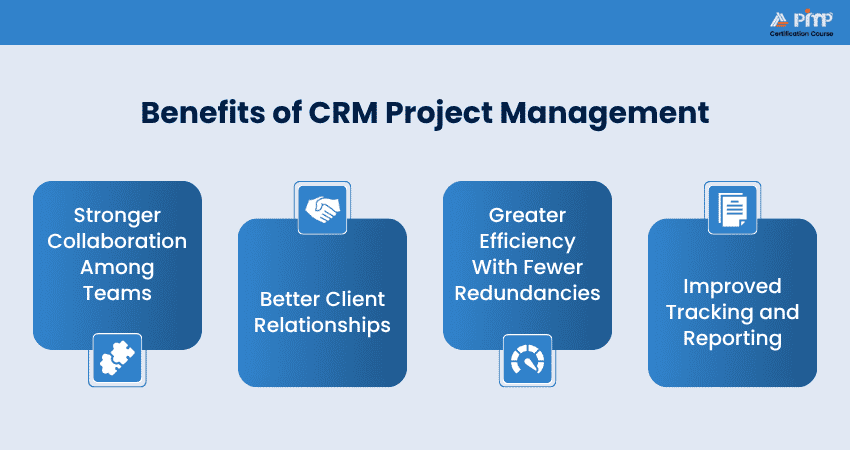
CRM Project Management solutions improve both operational efficiency and customer satisfaction. Some of its benefits include the following:
![]()
1) Stronger Collaboration Among Teams
When sales and project teams use different tools, information transfer becomes manual. This often leads to scope misunderstandings. CRM Project Management allows both teams to work in the same environment. Project teams can read original client requirements, while sales teams can see delivery progress. Everyone stays aligned without endless internal meetings.
2) Better Client Relationships
Your clients care about communication as much as the final result. They want quick answers and clear updates. CRM Project Management makes this possible. If a client calls support, the employee can see the project stage and past conversations immediately. The client does not need to repeat information. This creates a professional experience and builds trust.
3) Greater Efficiency With Fewer Redundancies
Using different systems often forces employees to enter the same data multiple times. They may copy customer details into project tools, send repeated emails, and recreate schedules manually. CRM Project Management removes these repetitive tasks. Information entered once becomes available across the workflow.
4) Improved Tracking and Reporting
Project performance is easier to analyze when customer and project data exist together. Businesses can monitor timelines, workload distribution, project profitability, and customer retention altogether. These insights help managers identify delays early, improve planning, and understand which services or projects generate the most value.
Features of CRM Project Management Solution
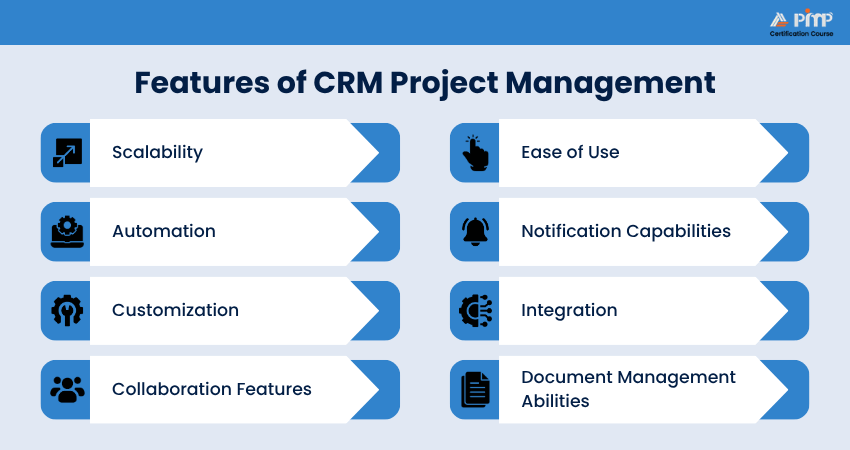
A CRM Project Management solution should not only store customer details but also support daily project work. It acts as a central workspace where teams manage communication, tasks, and files together. Below are the most important features that it should have:
1) Scalability
Scalability means the software can grow along with your business. A small company may start with only a few customers and projects, but as the business expands, the number of clients, employees, and tasks also increases. The system needs to handle this growth without slowing down or needing replacement.
A scalable CRM allows you to add more users, projects, and workflows easily. You can introduce advanced reports, departments, and permissions when required.
2) Automation
Automation is one of the most valuable features in CRM Project Management. It reduces manual work by letting the system perform repetitive activities automatically. It includes task creation, client onboarding emails, reminder notifications, invoice generation, follow-up messages, and more.
For example, when a deal is closed, the system can automatically create a project, send a welcome email to the client, and schedule follow-ups.
3) Customization
Every organization has its own workflow structure. A marketing agency, an Information Technology (IT) company, and a construction firm all manage projects differently. A good CRM Project Management allows businesses to customize the platform based on their working style. It can include creating custom fields, project stages, dashboards, and reports.
This feature makes the system flexible and ensures employees can work naturally instead of adjusting their processes to fit the software.
4) Collaboration Features
Projects always involve multiple people. Team members need to communicate, share updates, and solve problems together. Collaboration features help teams work inside the same platform instead of using different communication tools. Common options include comments on tasks, shared calendars, file sharing, and team mentions.
By keeping conversations connected to specific tasks or projects, team members can easily understand the context of a discussion.
5) Ease of Use
Even a powerful system becomes ineffective if employees find it difficult to operate. A good CRM Project Management solution should be simple and user-friendly. Clear navigation, a clean dashboard, easy task updates, and mobile accessibility encourage employees to use the system seamlessly and regularly.
Employees spend less time learning the software and more time completing their work. This reduces resistance to new technology and ensures the system supports productivity.
6) Notification Capabilities
Notifications keep team members aware of important updates. The system alerts users about new assignments, due dates, approval requests, client replies, and status changes. These reminders help employees stay organized and respond quickly, improving accountability and project timelines.
With timely alerts, nothing important is overlooked. Team members can prioritize urgent tasks, avoid missed deadlines, and maintain steady progress throughout the project.
7) Integration
Businesses usually use several software tools such as email platforms, accounting software, and marketing systems. Integration allows the CRM Project Management to connect with these tools. For example, emails can be saved in the client profile; invoices can sync with accounting software and leads from marketing campaigns can enter the CRM directly.
This connection prevents duplicate data entry and ensures information flows smoothly between systems. Teams can work efficiently without switching between tools.
8) Document Management Abilities
Projects usually generate many documents, including business proposals, contracts, designs, and invoices. Without proper organization, files can easily get lost. Document management features of CRM in Project Management solve this problem. It allows teams to upload, store, and share files securely.
Employees can access the latest version of documents anytime, and clients can also review files when needed. Centralized storage keeps everything organized and makes project tracking easier.
Discover project planning, timelines, and resource scheduling with the
PMI Scheduling Professional (PMI-SP)® Certification
– Sign up soon!
CRM vs Project Management Software
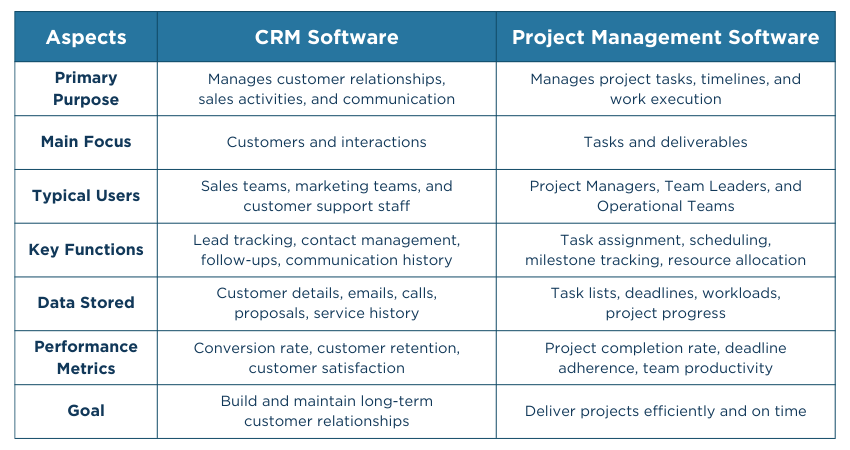
Many businesses assume CRM software and Project Management software serve the same purpose. While both help teams stay organized, they are designed for different stages of business operations. Let's check how they differ:
Customer Relationship Management Software
1) Primary Focus:
CRM software focuses on managing customer interactions and improving relationships. Its main goal is to track leads, nurture prospects, and maintain long-term client engagement.
2) Main Users:
It is mainly used by sales, marketing, and customer support teams who interact directly with clients.
3) Core Functions:
CRM systems handle contact management, communication tracking, sales pipeline monitoring, follow-ups, and customer history.
4) Stage of Use:
CRM is most active before a project starts and after it is completed, during sales and post-delivery support.
5) Performance Metrics:
It measures sales growth, conversion rates, customer retention, and overall customer satisfaction.
Project Management Software
1) Primary Focus:
Project Management software focuses on planning, organizing, and completing tasks within a defined timeline and budget.
2) Main Users:
It is mainly used by Project Managers, Team Leaders, and Operational Teams responsible for execution.
3) Core Functions:
It includes task assignment, scheduling, resource allocation, milestone tracking, and progress monitoring.
4) Stage of Use:
Project Management software is mainly used during planning, execution, monitoring, and project delivery phases.
5) Performance Metrics:
It measures task completion rates, deadline adherence, resource usage, and overall project performance.
How to Choose the Right CRM Project Management Software?
Selecting the right CRM Project Management software ensures your teams can manage customers and projects efficiently without unnecessary complexity. The system needs to match your workflow, be easy for employees to use, and support business growth. Here are the factors that you need to consider before choosing one for your business:
1) Define Your Business Needs:
Identify the type of projects, customers, and workflows your organization manages.
2) Check Integration Capabilities:
Ensure the software connects with your existing tools such as email and accounting systems.
3) Evaluate Scalability:
Choose a solution that can grow with your business and support increasing users or projects.
4) Assess Automation Features:
Look for tools that reduce manual work through task creation, reminders, and follow-ups.
5) Review Customization Options:
Confirm whether you can adapt workflows, fields, and dashboards to your needs.
6) Analyze Reporting Capabilities:
Ensure the software provides insights into project progress and customer data.
7) Compare Support and Pricing:
Evaluate vendor support, onboarding assistance, and overall cost.
Conclusion
CRM Project Management connects customer handling and project delivery into one smooth workflow. It helps maintain client information, communication, and tasks on a single platform. This leads to better coordination, fewer delays, and more reliable project outcomes. Ultimately, it helps businesses build stronger client relationships while supporting steady long-term growth.
Strengthen your practical Project Management expertise with
Project Management Institute (PMI)® Certification
– Start now!


 Back
Back

 Topics

 Courses


 10 Aug 2026
 Maria Thompson