Project success today isn’t about working harder; it is about becoming smarter. As teams handle tighter deadlines, remote collaboration, and growing workloads, relying on manual processes or outdated systems often leads to delays and confusion. To make your project journey smoother, all you need is to implement a suitable Project Management Tool.
Modern Project Management Tools help teams plan better, collaborate seamlessly, and stay productive without unnecessary effort. In this blog, you can discover the top Project Management Tools that can significantly boost team productivity and help you deliver successful projects. Let’s get started!
What are Project Management Tools?
Project Management Tools are designed to assist individuals or teams in managing their projects. They are software or applications that help people plan, organize, track, and execute projects successfully. They bring tasks, timelines, resources, and communication into one central platform, making it easier to manage workloads, collaborate effectively, and keep projects on schedule. Its typical features include:
a) Task Assignment:
Tools for assigning tasks to team members.
b) Progress Tracking:
Features to monitor the progress of each task.
c) Resource Management:
Tools to manage the resources required for tasks.
These Project Management Tools aim to:
a) Enhance Interaction:
Increase communication and collaboration among team members.
b) Facilitate Information Sharing:
Ensure that information is easily accessible and shared within the team.
c) Achieve Objectives:
Help ensure that project goals are met within the expected timeframe.
Whether managing a small team, a department, or an entire organization, the right Project Management Tool can significantly improve the speed and success rate of a project.

Top 25+ Project Management Tools to Boost Productivity
Selecting the right tools for Project Management can make a major difference in how efficiently you manage your projects. With so many options available, finding the best free tools might be difficult. To help you navigate this, we’ve compiled a list of the top Project Management Tools.
These tools provide different features to suit different project needs, from task management to team collaboration. Let's look at them in detail:
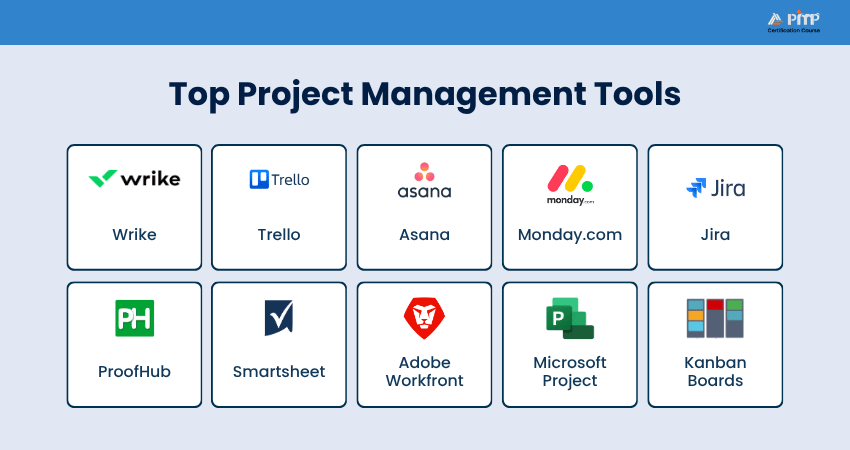
1) Wrike
Wrike is a powerful work management and project collaboration tool built for teams that need advanced planning and collaboration features. It offers task management, Gantt charts, workload views, and real-time reporting, making it ideal for medium to large teams. It helps improve visibility across projects and ensures everyone stays aligned with goals and deadlines.
Advantages:
a) Dynamic request forms for streamlined work intake
b) Advanced analytics and reporting for data-driven decisions
c) Customizable views and workflows
Disadvantages:
a) The Gantt Chart view is available only in paid plans
b) In-app timer for time tracking is only available on higher-tier plans
c) Can be expensive for small teams
Master dashboards, workflows, and reporting features with our
Wrike Training
– Register today!
2) Trello
Trello is a simple and visual Project Management tool based on Kanban boards, lists, and cards. It is easy to use and works well for small teams or straightforward projects. Trello allows users to track tasks, assign responsibilities, and monitor progress at a glance, making it a popular choice for beginners and Agile teams.
Advantages:
a) Update task status such as ‘To Do,’ ‘Backlog,’ ‘In Progress,’ and ‘Done’ with Kanban cards
b) User-friendly interface that is easy to navigate
c) Integrations with popular applications, including Slack, Google Drive, and Jira
Disadvantages:
a) Limited advanced features such as time tracking and Gantt charts
b) Scalability issues for large organizations
c) Over-reliance on third-party integrations for additional functionality
3) Asana
Asana helps teams plan, organize, and track work efficiently. It supports task dependencies, timelines, project goals, and team collaboration. It is useful for managing complex projects, improving accountability, and ensuring that work progresses smoothly from start to finish. It integrates file storage, project roadmaps, dashboards, and more into a single, user-friendly interface.
Advantages:
a) Task management with custom fields and dependencies
b) Project views including list, board, and timeline
c) Strong integration capabilities with other tools
Disadvantages:
a) One-person-per-task limitation
b) Absence of location data custom fields
c) Limited export options to formats like Excel
Plan, organize, and track projects more effectively with our
Asana Training
– Sign up soon!
4) Monday.com
Monday.com is a widely used Project Management software that provides different templates and tools to streamline operations and boost team productivity. Its visual and intuitive interface makes it simple for teams to collaborate and keep track of their projects.
Advantages:
a) Customizable workflows with over 200 templates
b) Visual dashboards for tracking project progress and team performance
c) Integrates with various third-party apps
Disadvantages:
a) Confusing pricing plans
b) Limited reporting features compared to other tools
c) Can become expensive as team size grows
5) Jira
Jira is designed to support Agile methodologies such as Scrum and Kanban. It helps teams plan sprints, track issues, manage backlogs, and monitor progress throughout the development lifecycle. It is popular among Software Development teams for its issue and bug-tracking capabilities.
Advantages:
a) Excellent for Agile and Scrum management
b) Robust issue and bug-tracking capabilities
c) Highly customizable to fit various Project Management methodologies
Disadvantages:
a) Steep learning curve for new users
b) Can be complex and overwhelming for non-technical teams
c) Performance issues with load times
6) ProofHub
ProofHub offers multiple features, including task management, time tracking, and online proofing. It provides a centralized workspace where teams can plan, collaborate, and deliver projects efficiently. Its custom roles and permissions ensure secure and organized Project Management.
Advantages:
a) Customizable workflows with Kanban boards and Gantt charts
b) Real-time collaboration with task comments and file sharing
c) Cost-effective flat rate pricing for midsize teams
Disadvantages:
a) Sometimes loads slowly
b) Lacks robust budgeting tools
c) Limited integrations compared to other tools
7) Smartsheet
Smartsheet is a spreadsheet-style Project Management tool that combines the familiarity of spreadsheets with advanced project tracking features. It supports automation, reporting, Resource Management, and collaboration. It works well for teams that prefer structured, data-driven project planning.
Advantages:
a) Highly customizable and flexible
b) Powerful analytics and reporting tools
c) Robust data protection and compliance
Disadvantages:
a) Steep learning curve
b) Add-ons required for time tracking and Resource Management
c) Pages do not update in real-time
8) Adobe Workfront
Adobe Workfront is an enterprise-level Project Management tool designed for large organizations. It focuses on work planning, Resource Management, and performance tracking. It is commonly used by marketing, creative, and operations teams to manage complex workflows.
Advantages:
a) Comprehensive project and Portfolio Management
b) Integration with Adobe Creative Cloud
c) Customizable workflows and templates
Disadvantages:
a) High cost, especially for small teams
b) Steep learning curve
c) Overwhelming for simple projects
9) Microsoft Project
Microsoft Project is a traditional Project Management tool used for detailed project planning and scheduling. It offers advanced features such as Gantt charts, resource allocation, and cost management. It is best suited for experienced Project Managers handling large and structured projects.
Advantages:
a) Seamless integration with the Microsoft ecosystem
b) Advanced Gantt charts and scheduling tools
c) Extensive reporting capabilities
Disadvantages:
a) Complicated and complex for new users
b) Expensive for large teams
c) Limited integrations outside Microsoft
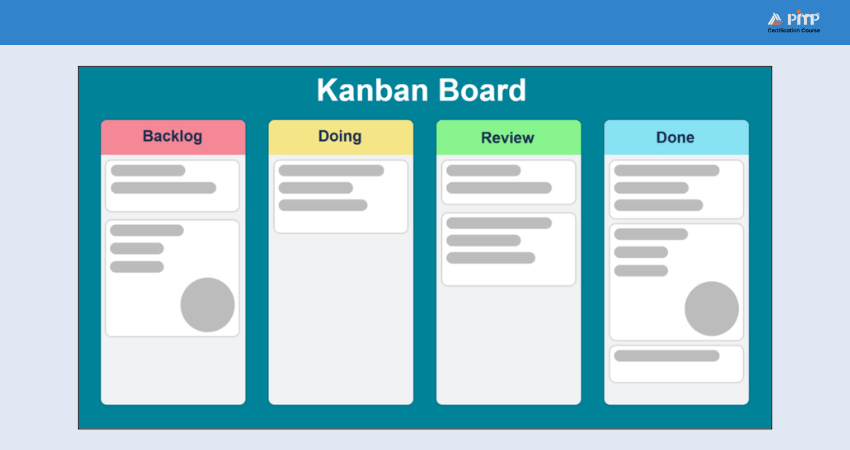
10) Kanban Boards
Kanban Boards are visual Project Management Tools used to manage tasks and workflows using columns such as To Do, In Progress, and Done. They help teams visualize work, limit bottlenecks, and improve continuous delivery. They are widely used in Agile and Lean project environments.
Advantages:
a) Easy to use and understand
b) Improves workflow visibility
c) Supports continuous improvement
Disadvantages:
a) Limited long-term planning features
b) Not ideal for complex dependencies
c) Can become cluttered with large projects
11) Basecamp
Basecamp is a simple Project Management and team collaboration tool designed to keep communication and tasks in one place. It includes to-do lists, message boards, schedules, and file sharing. It is suitable for small to medium-sized teams.
Advantages:
a) Clean and user-friendly interface
b) Strong communication features
c) Flat pricing structure
Disadvantages:
a) Limited advanced project planning tools
b) Not suitable for complex projects
c) Minimal reporting features
Keep your projects organized and on track with our
Basecamp Training
– Start today!
12) Zoho Projects
Zoho Projects, a component of the Zoho suite, is a cloud-based Project Management tool that supports task tracking, time management, and collaboration. It integrates well with other Zoho applications and is suitable for businesses of all sizes.
Advantages:
a) Affordable pricing with a free plan for small teams
b) Integration with other Zoho apps and third-party tools
c) Built-in chat and collaboration features
Disadvantages:
a) Limited free plan features
b) Few third-party integrations
c) No phone support
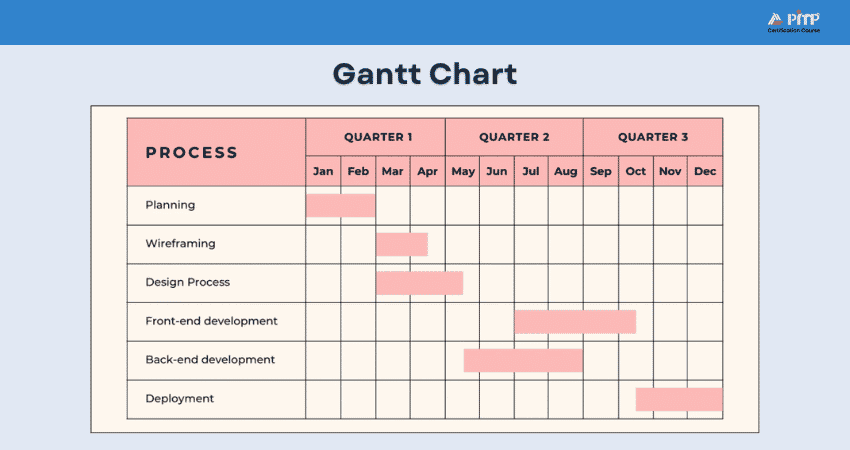
13) Gantt Charts
Gantt Charts are the best Project Management Tools used to plan and track project schedules. They display tasks, timelines, dependencies, and progress in a bar-chart format. They are commonly used for structured and timeline-driven projects.
Advantages:
a) Clear project timeline visibility
b) Easy tracking of dependencies
c) Helps manage deadlines effectively
Disadvantages:
a) Time-consuming to maintain
b) Less flexible for changing requirements
c) Not ideal for agile projects
14) Hive
Hive is a collaborative platform for Project Management to help teams control tasks, projects, and workflows efficiently. It offers flexible views, automation, and real-time collaboration features.
Advantages:
a) Multiple project views
b) Built-in automation tools
c) Strong collaboration features
Disadvantages:
a) Advanced features cost extra
b) Can feel overwhelming for small teams
c) Limited offline access
15) RACI Chart
A RACI Chart is a responsibility assignment tool used to clarify roles and responsibilities within a project. It defines who is Responsible, Accountable, Consulted, and Informed for each task. By clearly mapping ownership, it helps reduce confusion, improve communication, and ensure accountability across the project team.
Advantages:
a) Improves role clarity
b) Reduces confusion and overlaps
c) Enhances accountability
Disadvantages:
a) Time-consuming to create
b) Requires regular updates
c) Not suitable for fast-changing projects
16) Miro
Miro is an online collaborative whiteboard platform, which supports visual Project Management and brainstorming. It makes teams create and share interactive boards where they can map out ideas, plan projects, and collaborate in real-time. Its real-time collaboration features enhance team engagement and productivity.
Advantages:
a) Excellent for remote collaboration and brainstorming
b) Wide range of interactive templates
c) Integration with various tools and applications
Disadvantages:
a) Overwhelming functionality for new users
b) No way to save custom templates
c) Can be expensive for larger teams
17) Airtable
Airtable combines spreadsheet functionality with database features, making it a flexible Project Management tool. It allows teams to organize tasks, data, and workflows visually. Teams can customize fields, views, and automations to support different project workflows and collaboration needs.
Advantages:
a) Highly customizable
b) Easy-to-use spreadsheet format
c) Powerful integrations
Disadvantages:
a) Limited built-in project tracking
b) Can be complex for beginners
c) Costs increase with scale
Build powerful, custom databases for your team with our
Airtable Training
– Begin soon!
18) Critical Path Method (CPM)
The Critical Path Method (CPM) is used to find the longest sequence of dependent tasks. It helps determine the minimum project duration and prioritize critical activities. By focusing on these tasks, Project Managers can manage delays and allocate resources effectively.
Advantages:
a) Improves schedule accuracy
b) Identifies critical tasks
c) Supports Risk Management
Disadvantages:
a) Complex for large projects
b) Requires accurate data
c) Less flexible to changes
19) Quire
Quire is a task-focused Project Management tool designed for breaking down complex projects into manageable tasks. It supports nested task lists and team collaboration. This structure helps teams maintain clarity, track progress easily, and manage detailed workflows efficiently.
Advantages:
a) Simple and clean interface
b) Strong task hierarchy
c) Available with the free plan
Disadvantages:
a) Limited reporting features
b) Not ideal for large teams
c) Fewer advanced integrations
20) Nifty
Nifty is a modern Project Management Tool designed to streamline workflows and improve team collaboration. It provides features like Task Management, milestone tracking, and document sharing, all within a single platform. Its intuitive design and powerful automation capabilities help teams become organized and focused on their goals.
Advantages:
a) Consolidates projects, work, and communications in one place
b) Simplifies and automates tracking of project milestones
c) User-friendly interface with powerful functionality
Disadvantages:
a) Limited customization options
b) Some users find the color scheme and fonts less appealing
c) Can be overwhelming for new users
21) ClickUp
ClickUp is a highly flexible Project Management software that helps teams to manage tasks, documents, goals, and time tracking on one platform. It offers all the essential management features needed for planning, organizing, and managing a wide range of tasks. Its customizable views and powerful integrations make it a flexible tool for diverse project needs.
Advantages:
a) Multiple task views, including list, board, and Gantt Chart
b) Built-in time tracking and goal-setting features
c) Robust free plan with many features
Disadvantages:
a) Steep learning curve because of the abundance of features
b) Limited mobile app functionality
c) Complex pricing structure
22) Teamwork
Teamwork supports collaboration and communication within teams and includes features like task lists, time tracking, file sharing, and integrations with well-known tools like Slack and Google Drive. It is particularly well-suited for agencies and client-facing businesses, because of its client management capabilities.
Advantages:
a) Task Management with subtasks and dependencies
b) Time tracking and billing features for client projects
c) Strong client management capabilities
Disadvantages:
a) Potential for conflicts and personality clashes within teams
b) Difficult to reach a consensus on decisions
c) Some users may not work as hard in a team setting
23) Stakeholder Mapping
Stakeholder Mapping is a Project Management technique used to identify and analyze stakeholders based on influence and interest. It helps improve communication and decision-making. By understanding stakeholder priorities, teams can manage expectations and decrease potential conflicts.
Advantages:
a) Builds stronger stakeholder involvement
b) Helps identify and manage risks
c) Improves structured communication planning
Disadvantages:
a) Relies on subjective judgement
b) Needs frequent review and updates
c) Cannot function as a standalone tool
24) Awork
Awork is a modern Project Management and team scheduling tool designed for agencies and service teams. It focuses on planning, collaboration, and time tracking and provides clear project timelines and workload visibility for better Resource Management. It also supports real-time collaboration, helping teams stay aligned on tasks and deadlines.
Advantages:
a) Clean and modern interface
b) Strong time planning features
c) Good team collaboration
Disadvantages:
a) Limited third-party integrations
b) Reporting could be improved
c) Less suitable for large enterprises
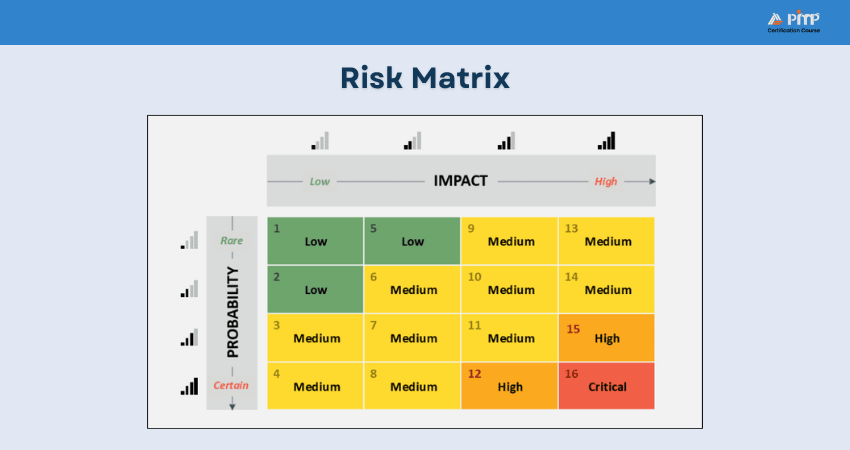
25) Risk Matrix
A Risk Matrix is used to assess and prioritize project risks based on likelihood and impact. It supports effective Risk Management planning. By visually mapping risks, teams can quickly identify high-priority threats. This helps Project Managers take proactive actions to minimize potential issues.
Advantages:
a) Simple risk visualization
b) Supports decision-making
c) Easy to understand
Disadvantages:
a) Oversimplifies complex risks
b) Subjective scoring
c) Needs regular review
26) Resource Guru
Resource Guru is a resource scheduling and capacity planning tool. It helps teams manage workloads, availability, and resource utilization effectively. The tool provides a clear view of team capacity, preventing overbooking and burnout. It is especially useful for teams managing multiple projects and shared resources.
Advantages:
a) Easy resource scheduling
b) Clear availability tracking
c) Improves workload balance
Disadvantages:
a) Limited reporting and analytics features
b) Fewer integrations compared to other platforms
c) Pricing may be high for a small team
27) Cost Breakdown Structure (CBS)
Cost Breakdown Structure is used to organize and track project costs by categories. It helps control budgets and monitor expenses. By breaking costs into detailed components, it improves cost transparency and financial control. It also supports accurate budgeting and forecasting throughout the project lifecycle.
Advantages:
a) Improves cost control
b) Clear financial visibility
c) Supports budget planning
Disadvantages:
a) Requires accurate estimates
b) Time-consuming to maintain
c) Limited scheduling features
28) Work Breakdown Structure (WBS)
Work Breakdown Structure is used to divide a project into smaller, manageable components. It improves planning, estimation, and task allocation. By breaking work into clear deliverables, teams gain better visibility of project scope. This approach also helps reduce risks and ensures responsibilities are clearly defined.
Advantages:
a) Improves project scope clarity
b) Makes progress tracking easier
c) Supports accurate cost and time estimation
Disadvantages:
a) Time-intensive to create
b) Needs frequent updates
c) Not flexible for changing scope
How to Choose Project Management Software?
Choosing proper Project Management software is an important step in improving how your team plans, works, and delivers projects. Here are the things that you need to consider before choosing one:
1) Features for Team Collaboration
Good Project Management software should make it easy for team members to work together. Look for tools that allow task sharing, comments, file uploads, and real-time updates. These features help everyone stay connected, avoid confusion, and work smoothly, especially in remote or hybrid teams.
2) Customizations and Flexibility Options
Every team works in its own way, so the software should let you adjust workflows, views, and settings. Flexible tools allow you to manage projects in a way that suits your team, whether you follow agile, waterfall, or a mix of both.
3) Ease of Adoption and Implementation
Your software should be simple to use and quick to set up. An easy interface, clear instructions, and helpful support make it easier for teams to start using the tool without long training sessions or disruption to daily work.
4) Scalability and Pricing Plans
Select a tool that can scale with your team. It should support more users and projects as your needs increase, with pricing plans that remain affordable and flexible over time.
5) Reporting and Analytics Capabilities
Reporting features help you see how your project is progressing. Simple dashboards and reports make it easier to track tasks, deadlines, and performance, helping you make better decisions and keep projects on track.
6) Data Security and Protection Measures
Project data can be sensitive, so security is important. Make sure the software protects your data with secure access, regular backups, and safety controls to prevent unauthorized use.
7) Integration With Existing Tools and Software
Your software should work well with tools you already use, such as email, calendars, file storage, or communication apps. Good integrations save time and reduce the need for manual updates.
8) Mobile Accessibility and Responsive Design
A mobile-friendly feature allows team members to check tasks and updates from anywhere. Responsive design or mobile apps make it easy to manage work on phones or tablets without losing functionality.
Advantages of Utilizing Project Management Tools
Utilizing the best Project Management Tools can significantly enhance the efficiency and success of your projects. By integrating these tools into your Project Management process, you can overcome common challenges and achieve better results.
Here are some key advantages of using such tools:
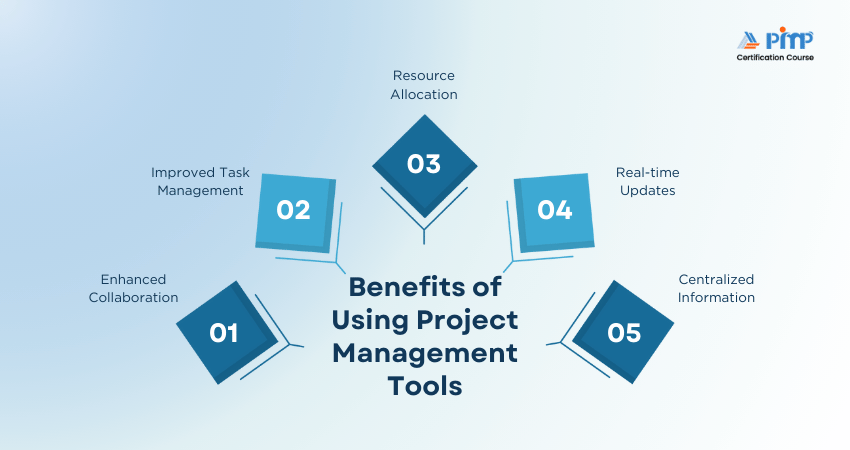
a) Facilitate better communication and teamwork, ensuring everyone is aligned and informed.
b) Organize tasks, set priorities, and efficiently track progress, making it simpler to manage workloads and deadlines.
c) Allocate resources effectively, including team members, time, and budget, to optimize usage and avoid overburdening.
d) Receive real-time updates on project status, enabling informed decision-making and quick issue resolution.
e) Store all project-related information in one place, making it simply accessible and reducing the risk of data loss.
f) Automate repetitive tasks and workflows, saving time and minimizing human error.
g) Generate detailed reports and analytics to track project performance and make data-driven decisions.
h) Clearly assign tasks and responsibilities, ensuring everyone knows their role and is accountable.
i) Detect risks early and create mitigation strategies to keep the project on track. Project Risk Management involves identifying, assessing, and addressing potential risks.
j) Track expenses and manage budgets effectively, helping to avoid overspending and ensuring financial control.
Conclusion
Choosing suitable Project Management Tools can make a real difference in how effectively your team works and delivers results. With different tools, techniques, and frameworks available today, there is a solution to suit every team size, project type, and working style. By understanding your needs, comparing features, and selecting tools that matches your goals, you can boost productivity, and set your projects up for long-term success.
Learn how to customize Notion for your team’s needs with our
Notion Training
– Explore now!


 Back
Back

 Topics

 Courses


 10 Aug 2026
 Veronica Davis