Managing work should make life easier rather than more stressful. However, choosing the right tool can often feel like just another task on your to-do list. If you have ever juggled deadlines, team updates, and endless task lists, you have likely wondered which platform truly fits your workflow. This is exactly why the debate around Trello vs Asana resonates with so many teams trying to stay organized without feeling overwhelmed.
In this blog, we simplify the choice by clearly breaking down Trello vs Asana. You will explore the key differences, compare features and pricing, and identify the best use cases to find the right fit for your team. Let's get started!
Overview of Trello and Asana
Trello and Asana are the two most popular Project Management tools today. They help the Project Management team organize tasks efficiently through real-time collaboration and the incorporation of various integrational features.
Both Trello and Asana feature intuitive dashboards and key visualization tools that enable businesses to attain comprehensive views of the entire Project Management process. Many top companies, including Google, Adobe, Deloitte, Uber, and Airbnb, actively leverage these tools to scale up their productivity levels.
What's new in Trello?
Trello has introduced AI features for Premium and Enterprise users that help identify action items from text and improve writing quality. It has also added collapsible lists and list colors to make boards more organized and visually clear.

What's new in Asana?
Asana's latest updates focus on improving workflows and Portfolio Management. These include enhanced automation with manual triggers, upgraded dashboards and executive summaries, streamlined portfolio automation, and AI-powered smart chat for better collaboration.
Trello vs Asana: Key Differences
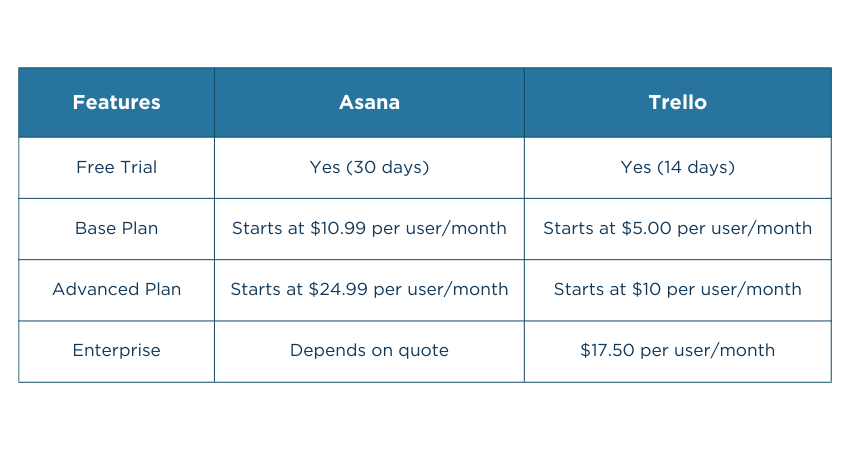
Both Trello and Asana are common Project Management tools that help perform project-related tasks more easily. However, there are several important differences between them, as highlighted in the Trello vs Asana comparison below:
1) Trello vs Asana: Support
a) Trello
Trello offers 24/7 customer support for Premium and Advanced users. Standard users also enjoy this benefit but only during local business hours. Free users enjoy community support, where they can interact with other users and share their feedback, experiences, and complaints related to the services.
b) Asana
You may not find dedicated 24/7 support, but there are multiple channels through which you can interact with its customer support team. These include support forms, help centers, Chatbots, Webinars, developer's guides, and community forums.
2) Trello vs Asana: Ease of Use

a) Trello
Trello isn't cluttered with too many features to complicate things. It comprises a simple and intuitive Kanban-style interface where even novice users can easily operate their projects.
b) Asana
Asana also has comparatively similar usability levels; however, the features offered there have steeper learning curves. This means you have a lot to learn from this Project Management Tool.
3) Trello vs Asana: Integrations
a) Trello
Trello integrations are known as Power-Ups and there are 200+ integrations for the users to choose from. This makes it easier for the users to connect with third-party applications, such as Jira, Slack, and Google Calendar.
b) Asana
Asana, too, comes with 200+ integration choices. Here, users can integrate their existing work tools like Microsoft Teams, Loom, Zapier, and Slack and perform automation more easily than Trello. Moreover, users can also incorporate their Trello ID to leverage the best capabilities of both tools.
Leverage Trello seamlessly and scale up your work performance- Join our Trello Training today!
1) Project and Task Management Tools
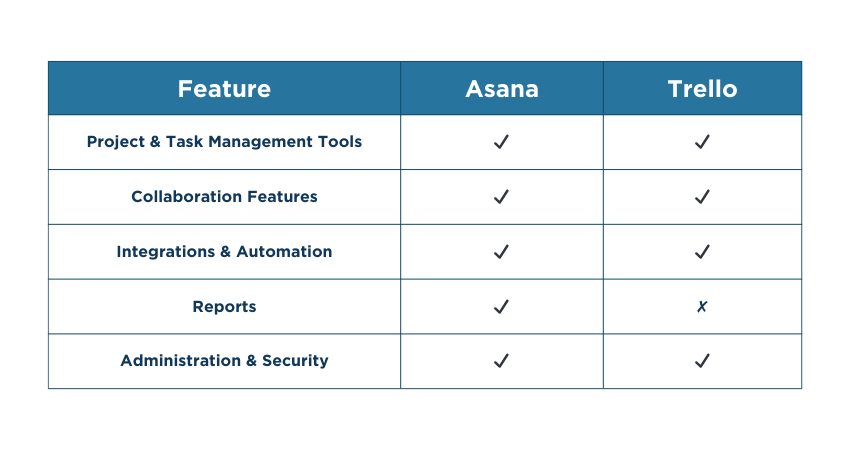
Trello uses simple Kanban boards and cards, making task management easy for small teams. Asana offers advanced features like subtasks, dependencies, milestones, and multiple views for complex projects.
2) Collaboration Features
Asana offers structured collaboration with built-in tools for project conversations, progress tracking, and workload visibility. Trello focuses on collaboration on cards and boards using comments, attachments, and notifications.
3) Integrations and Automation
Trello connects with many apps using Power-Ups and includes automation through its Butler feature. Asana also integrates with over 200 apps and provides automation via rules, helping teams streamline repetitive tasks across complex workflows.
4) Reports
Asana offers built-in reporting, dashboards, and analytics that give teams insight into project performance and progress. Trello's reporting is more basic and usually requires third-party integrations to gain deeper analytics.
5) Administration and Security
Asana provides advanced admin controls and detailed permission settings. This makes it suitable for larger organizations with strict governance needs. Trello offers simpler admin and security features. These include two-factor authentication and data encryption.
Asana vs Trello: Pricing and Value
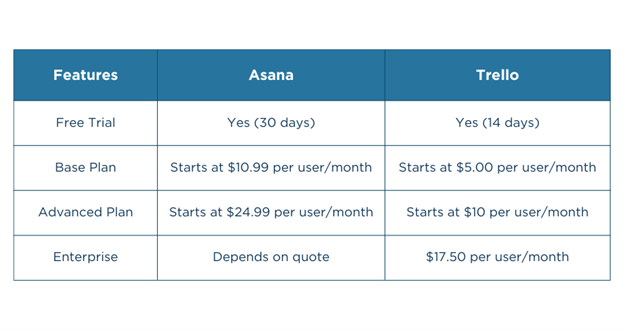
Both Asana and Trello have different prices and value levels for their clients. Here is a brief Asana vs Trello pricing comparison between the two:
Best Use Cases for Asana and Trello
Asana and Trello are widely used tools for managing work, but they shine in different situations. Each platform is designed to support specific team sizes, workflows, and project complexity. Below, we outline the best use cases for each tool to help you choose the right one:
Best Use Cases for Asana
1) Project Management: Assign tasks, track deadlines, milestones, workloads, and resources
2) Marketing and Communications: Plan campaigns, manage content, and track performance
3) Operations and IT: Manage operational workflows and IT projects centrally
4) Product and Engineering: Coordinate product development, engineering tasks, and sprints
5) Sales and Customer Success: Track pipelines, manage follow-ups, and customer activities
6) Design Teams: Organize creative requests and collaborate on design projects
7) CRM Use: Customize workflows to manage leads and accounts
8) Education and Events: Plan curricula, manage student work, and organize events
9) Business Owners: Oversee projects, operations, and team performance
Best Use Cases for Trello
1) Project Management: Track tasks and milestones using simple visual boards
2) Brainstorming: Capture ideas and keep them visible and actionable
3) Nonprofits: Coordinate volunteers and fundraising activities
4) Editorial Calendars: Manage content planning, reviews, and publishing
5) Finance Tracking: Improve visibility and reduce missed deadlines
6) Client Billing: Manage clients, time tracking, and appointments
7) Meetings: Plan agendas, notes, and follow-ups
8) Process Tracking: View progress at a glance and spot blockers quickly
9) Professional Services: Manage multiple clients and priorities with ease
Master core features and functionalities of Notion- Sign up for our Notion Certification today!
Similarities Between Asana and Trello
Both Asana and Trello are popular Project Management tools used by teams to plan, track, and manage work efficiently. While each has its own strengths, they share several core features that make collaboration easier. Below are the key similarities between them:
1) Essential Project Tools: Both allow teams to create, assign, and track tasks easily.
2) Easy to Use: Their clean, intuitive interfaces make adoption quick for new users.
3) Multiple Project Views: Each offers different ways to view work, such as boards, lists, calendars, or timelines.
4) Wide Integrations: Both connect with popular apps like Google Drive, Slack, and other productivity tools.
5) Workflow Automation: They reduce manual work using built-in automation features.
6) Strong Collaboration: Teams can comment, share files, and get notifications within tasks.
7) Apps Across Devices: Both provide desktop and mobile apps for working on the go.
8) Free Plans Available: Both offer capable free versions suitable for individuals and small teams.
Trello vs Asana: Which is Better?
There has been stiff competition between both Trello and Asana in terms of capabilities, quality and user-friendliness. Both carry various collaboration features, automation processes, customer support services, and integrations.
1) Choose Trello if you are looking for:
a) Budget-friendliness
b) Beginner-friendly interface
c) Robust customer service
2) Choose Asana if you are looking for:
a) Steeper learning opportunities
b) Leveraging both Trello and Asana's capabilities together
c) Better integration facilities
Conclusion
Both Trello and Asana have made a special spot in the realm of Project Management. Each carries its own set of pros and cons. While Trello has an easier and more intuitive user interface, Asana comes with a steeper learning curve and comparatively more robust features. It's important to leverage the capabilities of both tools and understand the Trello vs Asana differences to maximize your Project Management efforts.
Building your Project Management skills cannot be this easy with our PMP Certification- register today!


 Back
Back

 Topics

 Courses


 10 Aug 2026
 David Walter