Picture a project meeting where every department gives a different version of the project status. The design team says the work is complete, the development team is waiting for approvals and management believes everything is running on time. This situation is more common than many businesses realize, and it highlights the importance of using a Project Roadmap.
A Project Roadmap gives teams a clear overview of project activities in one place to reduce the chances of delays or misunderstandings. In this blog, we will explore what is a Project Roadmap, why it is important, its components, and best practices to manage projects effectively. Let's dive in!
What is a Project Roadmap?
A Project Roadmap is a visual plan that outlines the objectives, timelines, milestones, and major activities of a project. It provides a high-level overview of how a project will progress from the beginning to the end.
Project Roadmaps are used across many industries, including Information Technology (IT), construction, marketing, and product development. They improve communication by giving everyone a shared view of the project. They also make it easier to identify risks, dependencies, and upcoming milestones.

Importance of Project Roadmap
A Project Roadmap is important because it connects strategy with execution. It transforms complex project details into a simple, understandable structure that stakeholders and teams can follow easily. It offers proper alignment of the project tasks and helps teams stay focused throughout the project lifecycle.
Project Roadmaps also support better decision-making. Managers can quickly identify delays, resource issues or dependency conflicts before they become major problems. This visibility allows organizations to respond faster and reduce project risks.
Key Components of a Project Roadmap
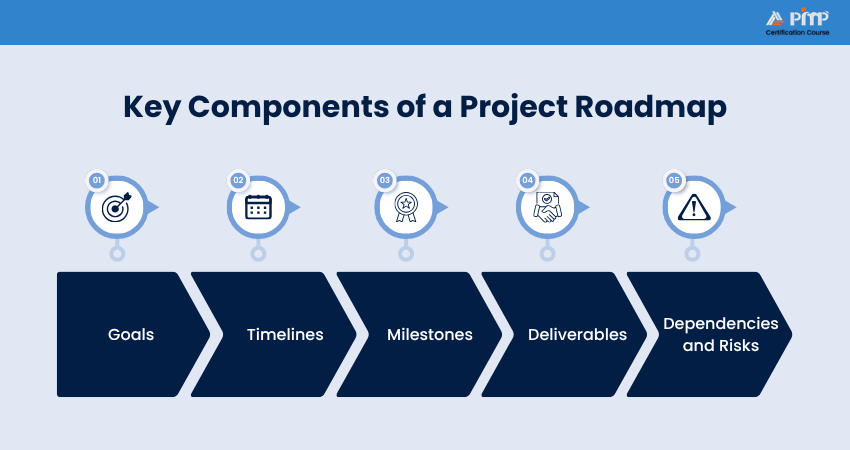
A Project Roadmap includes a few key components that help explain how the project will move forward. Let's check these components in detail:
1) Goals
Goals explain what the project aims to achieve. They provide direction and help teams understand the purpose behind the work being done. Project goals need to be specific, measurable and realistic.
For example, a software implementation project might have goals such as improving customer response time or automating manual reporting processes.
2) Timelines
Timelines show when project activities, milestones and deliverables are expected to happen. They help teams understand project duration and ensure deadlines are visible to everyone involved. It can be displayed monthly, quarterly, or weekly depending on project complexity.
For example, the software implementation may handle the requirement gathering in the first month, system testing in the third month and final deployment by the end of the quarter.
3) Milestones
Milestones are significant checkpoints within the project lifecycle. They represent major achievements or phase completions. They help track progress and provide opportunities to review project performance before moving to the next stage.
For example, milestones such as completion of system design, successful user acceptance testing and final software deployment are added.
4) Deliverables
Deliverables are the outputs produced during the project. These can include reports, software modules, marketing assets or prototypes. Clearly defining deliverables helps teams understand what needs to be completed and ensures stakeholders know what to expect at each stage.
For example, you can set deliverables for the software such as a fully developed application, user guides and performance reports.
5) Dependencies and Risks
Dependencies refer to tasks or activities that rely on the completion of other tasks before they can begin. Risks are potential issues that may affect project success. These may include budget limitations, resource shortages, technical problems or changing requirements. Including risks and dependencies in the roadmap helps teams prepare mitigation strategies early.
For example, software development may only begin after stakeholder approval, while risks may arise from system errors or changing project needs.
Build a strong foundation in project planning with Certified Associate in Project Management (CAPM) ® Training – Register today!
How to Create a Project Roadmap (Step-by-Step)?
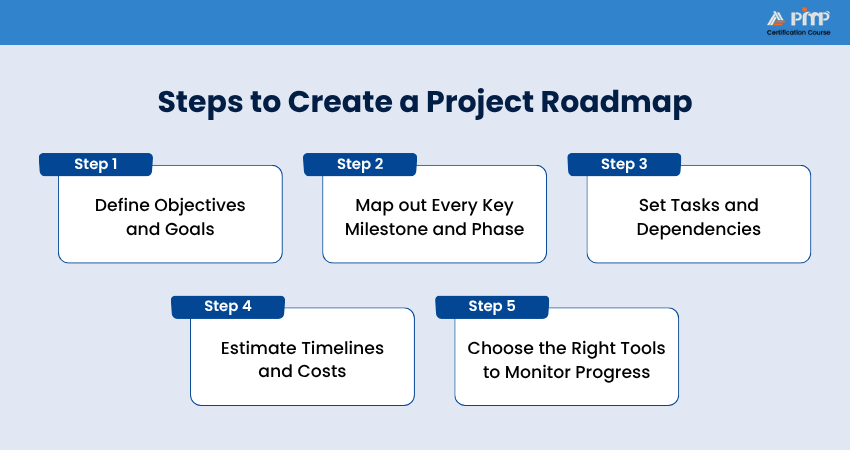
Creating a Project Roadmap requires careful planning and clear strategic thinking. The following steps can help organizations build an effective roadmap:
Step 1: Define Objectives and Goals
The first step is identifying the purpose of the project and defining clear objectives. They should align with organizational strategy and stakeholder expectations. For that, you can start by asking questions such as:
1) What issue is the project trying to solve?
2) What business value will it deliver?
3) What outcomes are expected?
For example:
1) Reduce operational costs by 15% within six months
2) Launch a new mobile application by Q4
3) Improve customer satisfaction scores by 20%
Step 2: Map out Every Key Milestone and Phase
Once project objectives are defined, break the project into major phases and milestones. Common project phases include:
1) Initiation
2) Planning
3) Execution
4) Testing
5) Deployment
6) Closure
Within each of these phases, you need to identify important milestones that indicate progress. These milestones act as checkpoints that help teams measure project performance and track completion of major activities. This step creates the structure of the roadmap and makes progress easier to visualize.
For example:
In a website redesign project, here are the project milestones and phases you can probably have:
1) Requirement approval
2) Wireframe completion
3) Content migration
4) User testing
5) Final launch
Step 3: Set Tasks and Dependencies
After defining milestones, identify the major tasks needed to complete each phase of the project. These tasks should be clearly organized so teams understand what work needs to be completed at every stage. After that, decide on dependencies between tasks. Some activities cannot begin until others are finished.
For example:
1) Design approval before development
2) Budget approval before procurement
3) User training before implementation
Step 4: Estimate Timelines and Costs
Once the tasks and dependencies are identified, the next step is to estimate how much time and budget the project will require. This includes calculating:
1) Task durations
2) Resource requirements
3) Budget needs
4) Equipment or software costs
Project Managers often use past project data, expert opinions or estimation techniques to make more realistic calculations. It is also important to include buffer time for unexpected delays or risks that may affect the project timeline.
For example:
A mobile application project may estimate:
1) Two weeks for User Interface (UI) design
2) Six weeks for application development
3) Two weeks for testing and bug fixes
4) Budget allocation for software tools and testing platforms
5) Marketing costs for the final product launch
Step 5: Choose the Right Tools (Gantt, Agile, Strategic) to Monitor Progress
The final step is selecting the right tools and roadmap format to track project progress. Different projects require different approaches based on their size, complexity and workflow. The right tool helps teams organize tasks, track timelines, monitor milestones and improve collaboration throughout the project lifecycle.
For example:
1) Gantt charts are useful for projects with fixed schedules and clear timelines
2) Agile roadmaps are better suited for flexible projects that require continuous updates and iterative work
3) Strategic roadmaps are commonly used for long-term business planning and high-level project tracking
Gain practical knowledge in project workflows with PMI Project Management Ready® Certification Training – Sign up soon!
Examples of Project Roadmaps
Project Roadmaps can look different depending on the type of project, industry and business goals. Some roadmaps focus on timelines and task dependencies, while others highlight milestones, deliverables or long-term strategic objectives. Let's explore some examples below:
Example 1: Software Development Roadmap
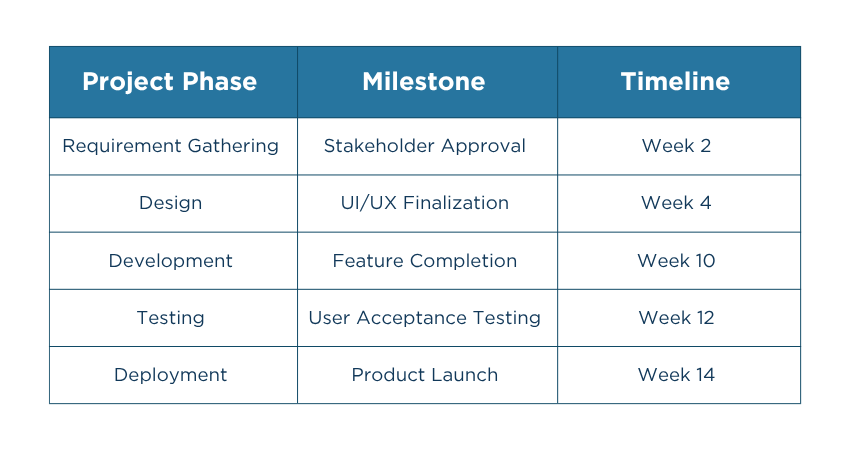
A Software Development Roadmap helps teams track each phase of the product development process, from requirement gathering to final deployment. Here is how it is planned:
Example 2: Marketing Campaign Roadmap
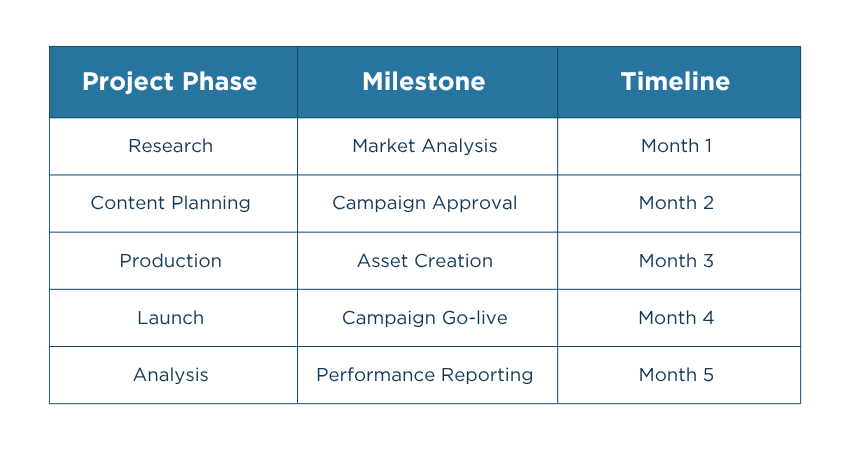
Below is an example of how a Marketing Campaign Roadmap may be structured:
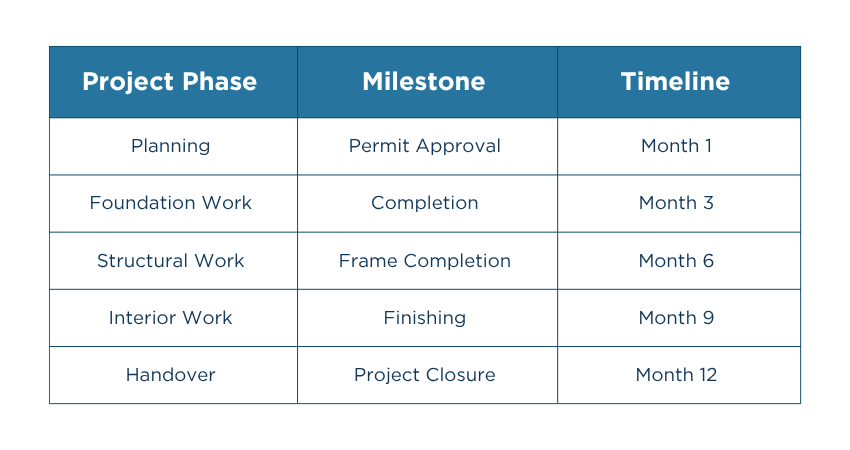
Example 3: Construction Project Roadmap
Here is an example of what a Construction Project Roadmap may look like:
What are the Benefits of Project Roadmaps?
Project Roadmaps offer several benefits that help organizations improve overall project visibility. Let's check the benefits they offer:
1) Improved Milestone Tracking for Lower Risk
A Project Roadmap makes it easier to track important milestones and deadlines throughout the project. Since every major checkpoint is clearly visible, teams can easily identify delays or problems before they become serious issues. This helps Project Managers take action early and keep the project on track.
Regular milestone tracking improves planning, reduces confusion and helps projects move forward smoothly without unnecessary delays.
2) Prioritize the Right Work for Better Focus
Projects often include too many tasks happening at the same time. A Project Roadmap helps teams focus on the most important activities by showing which tasks directly support project goals and milestones. This helps teams avoid spending time on less important work.
Clear priorities also improve productivity because teams know where to focus their efforts. This helps organizations use time and resources in the right manner throughout the project lifecycle.
3) Centralized Project Information for Greater Clarity
A Project Roadmap keeps all important project information in one place. Project teams and stakeholders can easily check timelines, milestones, responsibilities and project progress without searching through emails or multiple documents.
This ensures everyone involved in the project stays aligned with the same goals and updates. It also helps stakeholders make faster and better decisions because they have a clear overview of the project at every stage.
Project Roadmap Best Practices
Below are the best practices that you can follow for effective Project Roadmap creation:
1) Keep the Roadmap Simple
Avoid adding too much information to the roadmap. Focus only on important goals, milestones, timelines and deliverables so teams can understand the project easily.
2) Update the Roadmap Regularly
Projects often change because of new requirements, delays or shifting priorities. Regular updates help keep the roadmap accurate and useful for everyone involved.
3) Align the Roadmap With Business Goals
Ensure the roadmap supports overall business objectives and project priorities. This helps teams stay focused on work that delivers real value to the organization.
4) Involve Stakeholders Early
Include stakeholders during roadmap planning and discussions. Their feedback can improve project alignment, reduce misunderstandings and increase support for the project.
5) Use Clear Visual Elements
Use timelines, color coding, milestone markers or charts to make the roadmap easier to understand. Clear visuals improve communication and project visibility.
6) Identify Risks and Dependencies Early
Highlight possible risks and task dependencies during roadmap creation. This helps teams prepare solutions in advance and avoid unexpected delays later.
7) Focus on Communication and Collaboration
A Project Roadmap should help teams and stakeholders stay connected throughout the project lifecycle. Sharing updates regularly improves teamwork and keeps everyone aligned.
8) Choose the Right Tools
Select roadmap tools that match the project size, complexity and workflow. Tools like Jira, Trello, Asana or Microsoft Project can improve tracking and collaboration.
Conclusion
A Project Roadmap is one of the most valuable tools in Project Management. It helps organizations align teams and maintain focus throughout the project lifecycle. With the right planning, tools and best practices, you can use it to improve collaboration, reduce risks and successfully achieve project objectives.
Develop in-demand Project Management skills with Project Management Institute (PMI)® Certification Courses – Begin now!


 Back
Back

 Topics

 Courses


 10 Aug 2026
 Gary Moore