Is your team working on a complex project, and tasks are piling up? If so, you must be wondering how to keep track of everything. This is where the Scrum Board enters. This powerful tool transforms chaos into order, providing a visual representation of your project’s progress. But what exactly is this board, and how can you set one up effectively?
A Scrum Board is a visual framework used in Agile Project Management to track tasks and ensure team collaboration. Wondering how this simple board can make a significant impact on your project’s success? Let’s dive in and find out!
What is a Scrum Board?
A Scrum Board is a visual Project Management tool used in Agile projects to organize and monitor tasks throughout a sprint. It helps the Agile and Scrum team see the progress of tasks in real time by displaying user stories, tasks, and their current status. It manages work into columns such as To Do, In Progress, and Done, allowing teams to clearly see the status of each task.
A Scrum Board supports better planning and task management throughout the sprint cycle. It helps teams monitor daily progress, stay focused on sprint goals, and maintain accountability for assigned work. Ultimately, it improves collaboration by making the workflow transparent to everyone involved in the project.

What is the Purpose of a Scrum Board?
The main purpose of a Scrum Board is to provide a clear and visual representation of the work being carried out during a sprint. It provides a clear overview of what work needs to be done, what is currently in progress, and what has already been completed. By clearly displaying tasks and responsibilities, it ensures that everyone stays aligned with sprint goals and understands what needs to be prioritized.
It also helps team members to quickly identify pending work, ongoing activities, and complete tasks. In addition, the board helps teams detect workflow issues such as delays or bottlenecks. When tasks remain in one stage for too long, it signals that the team may need to adjust priorities or provide support.
Key Components of a Scrum Board
A Scrum Board consists of several important elements that help teams track and manage tasks during a sprint. Each component plays a role in making the workflow visible and ensuring that the team clearly understands the status of every task. Let's check those key components of a Scrum Board:
1) Task Cards
Task cards represent individual pieces of work that need to be completed during the sprint. Each card usually includes details such as the task name, description, assigned team member, and priority. These cards move across the board as the work progresses.
2) Workflow Columns
Workflow columns show the different stages of work within the sprint. Common columns include To Do, In Progress, and Done. These columns help teams visualise how tasks move from planning to completion.
3) User Stories
User stories describe the features or requirements from the end user’s perspective. They help teams understand what needs to be built and why it is important. Tasks on the Scrum Board are often created based on these user stories.
4) Sprint Backlog
The sprint backlog is a list of tasks and user stories that the team has committed to completing during the current sprint. It acts as the main source of work for the Scrum Board, with tasks moving through different workflow stages until they are finished.
5) Work in Progress (WIP) Limits
Work in Progress (WIP) limits control the number of tasks that can be in the In Progress stage at the same time. This prevents teams from taking on too many tasks simultaneously and helps maintain focus on completing work efficiently.
6) Swimlanes
Swimlanes are horizontal sections on the board that group tasks based on categories such as priority, team member, or type of work. They help teams organize tasks more clearly and manage complex projects more effectively.
7) Burndown Chart
A burndown chart is a visual chart that tracks the amount of work remaining in a sprint over time. It helps teams monitor progress and determine whether they are on track to complete all planned tasks before the sprint ends.
Bridge the gap between stakeholders and development teams – Join our Scrum Product Owner Certification now!
Types of Scrum Boards
Scrum Boards can be implemented in different formats depending on the team’s working style, location, and project requirements. While the purpose remains the same, the way the board is created and used can vary. Here are the most common types of Scrum Boards:
1) Physical Scrum Boards
A physical Scrum Board is typically created using a whiteboard, wall, or notice board in the team’s workspace. Tasks are represented using sticky notes or cards that move across columns such as To Do, In Progress, and Done. This approach works well for co-located teams because it encourages face-to-face communication and quick updates during daily stand-up meetings.
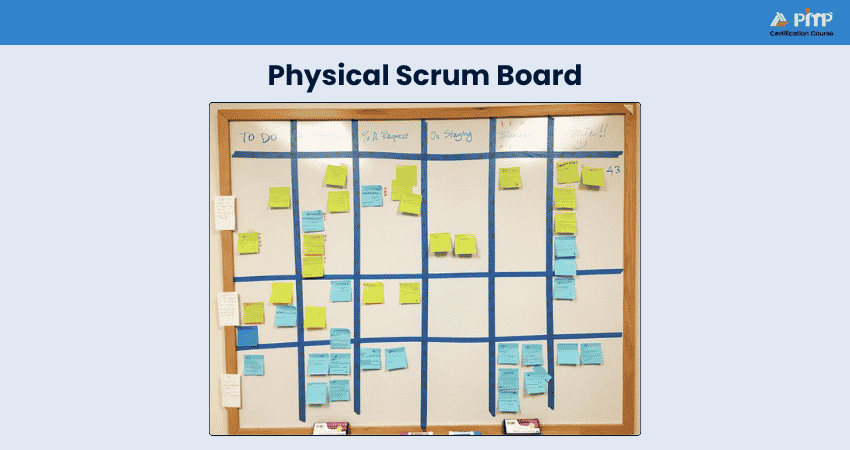
Physical boards are simple to set up and easy to modify, making them useful for teams that prefer a hands-on approach. However, they may not be ideal for remote teams since updates can only be viewed by those present in the workspace.
2) Digital Scrum Boards
Digital Scrum Boards are online tools that allow teams to manage and track tasks virtually. Platforms such as Jira, Trello, and more provide digital boards where team members can create, assign, and update tasks in real time. This type of board is especially useful for remote or distributed teams.
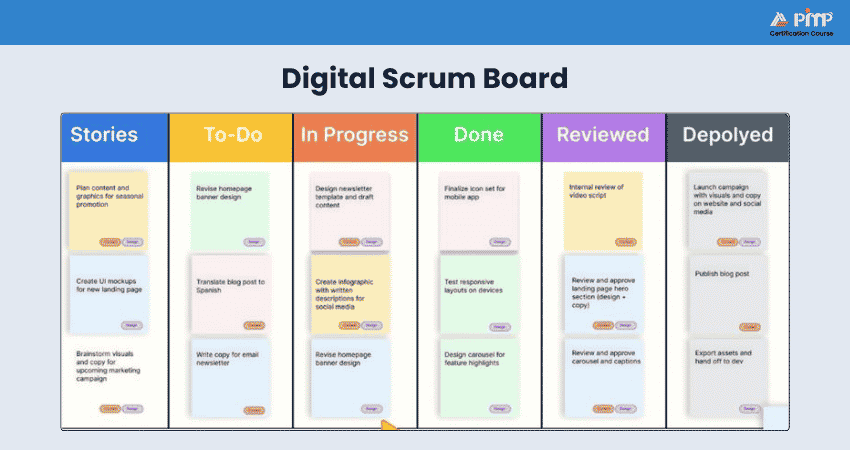
Digital boards offer additional features such as notifications, file attachments, task history, and reporting tools. They also make it easier to track progress over time and integrate with other Project Management software.
3) Hybrid Approaches
A hybrid Scrum Board combines elements of both physical and digital boards. Teams may use a physical board in the office for quick discussions while maintaining a digital version for documentation and remote access. This approach keeps team members informed, regardless of their location.
Hybrid boards provide flexibility by allowing teams to benefit from the simplicity of physical boards and the accessibility of digital tools. This makes them suitable for organizations with both in-office and remote team members.
Creating and Implementing Your Scrum Board
So far, you have explored what is the Scrum Board and its types. Now, it is time for you to get into knowing how to create and implement it for your project. Here are the steps you can follow for that:
1) Creating Your First Scrum Board
Creating your first Scrum Board involves the process of defining the structure that will help the team manage work during a sprint. Here are the things that you need to consider:
1) Choose Your Board Type: Decide whether a physical Scrum Board or a digital board using tools like Jira or Trello best suits your team’s working environment.
2) Define Your Columns: Start with the basic workflow columns such as To Do, In Progress, and Done. These represent the stages of tasks to move through during the sprint.
3) Create Your Backlog: List all tasks, features, or user stories that need to be completed in the project. This backlog becomes the main source of work for the team.
4) Prioritize the Backlog: Arrange the tasks based on priority, urgency, or business value so that the team focuses on the most important work first.
5) Set Your Sprint Goal: Define the objective the team wants to achieve by the end of the sprint. This goal keeps the team focused and aligned.
2) Customizing Columns and Workflows
Every team has a unique way of working, so it is often necessary to customize the Scrum Board to match specific processes. You can follow the procedure below for customizing your workflows and columns:
1) Analyze Your Workflow: Review the team’s development process to identify any additional stages involved in completing tasks.
2) Add Custom Columns: Create additional columns such as Testing, Review, or Blocked to represent specific stages in your workflow.
3) Define Column Policies: Clearly define what conditions must be met before a task can move into or out of each column. This ensures consistency across the team.
4) Implement WIP Limits: Set limits on how many tasks can be in a particular column at the same time to avoid overloading the team and reduce bottlenecks.
5) Create Swimlanes: Use horizontal lanes to organize tasks by priority, type of work, or team members, making it easier to manage complex projects.
3) Connecting Your Scrum Board with Existing Tools
Many organizations integrate their Scrum Boards with existing Project Management and collaboration tools. This practice can improve efficiency and reduce manual work. Here is how you can do it:
1) Identify Integration Needs: Determine which tools the Scrum Board should connect with, such as time tracking software, reporting tools, or communication platforms.
2) Choose Compatible Tools: If using a digital board, select tools that integrate easily with your existing systems to ensure smooth collaboration.
3) Set up Automated Workflows: Use automation features to update tasks automatically when actions occur in other tools, helping maintain accurate progress tracking.
4) Train Your Team: Make sure all team members understand how the integrated system works so they can use it effectively during the sprint.
5) Review and Improve Regularly: Continuously evaluate how the board and its integrations are functioning and make adjustments to improve efficiency and workflow management.
Benefits of Using Scrum Boards
Scrum Boards provide numerous benefits that enhance the efficiency of development processes, no matter the size of the team. Here are some of the key benefits of utilizing Scrum Boards:
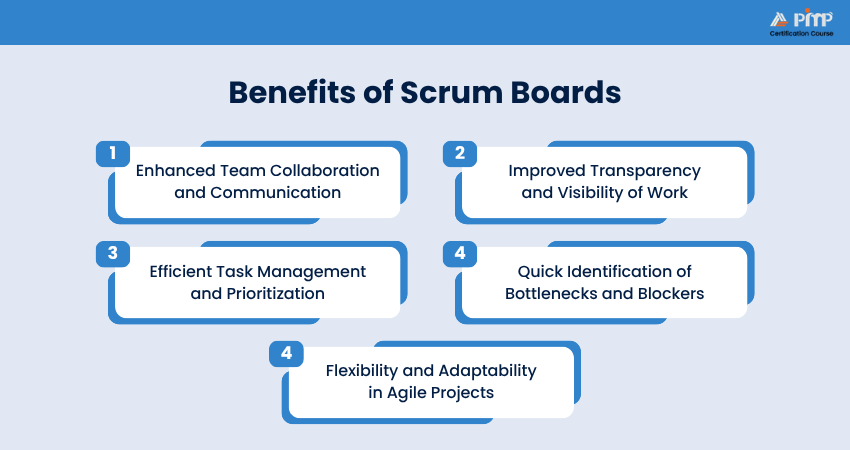
1) Enhanced Team Collaboration and Communication
Scrum Boards offer a shared visual representation of your team’s work, enabling members to collaborate and communicate from a single source of truth. This real-time visibility into tasks, progress, and updates guarantees that everyone involved in the project can make necessary adjustments or changes using the most current information.
A centralized framework fosters open communication during backlog organization, daily stand-ups, and sprint planning, allowing team members to talk about progress, challenges, and potential solutions without needing to compare notes. This unified approach promotes a sense of unity and shared accountability for the project’s success.
2) Improved Transparency and Visibility of Work
Scrum Boards provide the entire team with visibility into all tasks, backlogs, user stories, statuses, and other categories, ensuring complete transparency on the progress of every component of the sprint.
This transparency helps everyone understand what is happening, who is working on what, and which tasks are pending or completed. The improved visibility reduces confusion and redundant email chains, promoting efficient and informed collaboration.
3) Efficient Task Management and Prioritization
Scrum Boards enhance task management by offering a comprehensive overview of a project, segmenting it into manageable parts, prioritizing tasks, assigning them to team members, and monitoring progress using Scrum metrics. Tools and processes such as product backlogs and sprint planning help teams prioritize tasks based on their significance and value, ensuring they focus on the most crucial tasks first.
This leads to more efficient resource utilization and execution of deliverables. Real-time task status updates help ensure that no project components are overlooked.
4) Quick Identification of Bottlenecks and Blockers
The Scrum framework is adaptable and dynamic, enabling teams to make informed decisions and adjustments quickly when circumstances change unexpectedly. This flexibility is especially useful for addressing potential bottlenecks or unforeseen obstacles.
For example, Scrum Boards can implement Work-in-Progress (WIP) limits to prevent team members from being overwhelmed with too many tasks. This approach enhances resource visibility and encourages teams to complete ongoing tasks before starting new ones.
Foster a productive and motivated team environment – Sign up for our Scrum Master Certification.
5) Flexibility and Adaptability in Agile Projects
Scrum Boards are highly adaptable and capable of adjusting to different project and sprint scenarios by accommodating shifts in priorities, tasks, requirements, and resource availability throughout a sprint’s lifecycle. When market conditions change, new tasks arise, or priorities shift, teams can effortlessly update the board to mirror the new situation.
This adaptability supports the Agile philosophy of continuous improvement, ensuring the team stays flexible and responsive to change.
Common Scrum Board Challenges and How to Prevent Them
While Scrum Boards are highly effective for managing Agile workflows, teams may still face certain challenges when using them. Here are some of the challenges that you need to consider:
1) Handling Outdated or Unnecessary Tasks
One common challenge teams face is the accumulation of outdated or unnecessary tasks on the Scrum Board. Over time, tasks that are no longer relevant or have already been addressed may remain on the board, creating confusion and reducing visibility of active work.
To prevent this, teams should regularly review and clean up the board during sprint planning or retrospective meetings. Removing completed, duplicate, or irrelevant tasks keeps the board updated.
2) Managing Information Overload
Another challenge occurs when too much information is added to the Scrum Board. When task cards contain excessive details or when too many tasks are displayed at once, it becomes difficult for team members to quickly understand the board’s status.
Teams can manage this by keeping task descriptions clear and concise and limiting the amount of information shown on each card. Prioritizing tasks properly and using WIP limits can also help maintain focus and prevent the board from becoming cluttered.
3) Gaining Team Buy-in and Maintaining Consistent Use
A Scrum Board is only effective when the entire team actively uses and updates it. If team members forget to update task statuses or rely on external communication instead of the board, the information displayed may become inaccurate.
To prevent this, teams should make the Scrum Board a regular part of their daily workflow. Encouraging team members to rely on the board for tracking work also improves transparency and teamwork.
Scrum Board Best Practices
To maximize the effectiveness of your Scrum Board, it’s essential to follow certain quality practices. Let's check them in detail:
a) Keep it Simple: Start with a primary layout and effectively add complexity as required. An easy board with clear columns like “To Do,” “In Progress,” and “Done” can be very effective.
b) Regular Updates: Ensure the Scrum Board is often up to date, ideally in the course of each day’s stand-ups. This keeps the facts current and relevant for all team members.
c) Use Visual Indicators: Utilize color-coded sticky notes or labels to symbolize unique kinds of obligations, priorities, or statuses. This enables fast figuring out the condition of each venture at a glance.
d) Limit Work in Progress (WIP): Set WIP limits for columns to prevent team members from taking on too many duties right away. This enables maintaining consciousness and guarantees responsibilities are finished successfully.
e) Highlight Blockers: Clearly mark any impeded or blocked tasks. This makes it easier to identify and address issues that are preventing progress.
f) Encourage Team Ownership: Make sure all team members feel responsible for updating the board. This promotes a sense of ownership and accountability.
g) Review and Adapt: Constantly review the effectiveness of your Scrum Board during retrospectives. Be open to making changes as per feedback and evolving team needs.
h) Integrate with Tools: If using a virtual Scrum Board, integrate it with other tools your team uses, such as issue trackers or communication platforms, to streamline workflows.
i) Maintain Clarity: Avoid clutter by removing completed tasks promptly and keeping the board organized. This ensures that the board remains a useful tool rather than a source of confusion.
j) Celebrate Progress: Use the Scrum Board to celebrate milestones and completed tasks. This can boost team morale and motivation.
Scrum Board vs Kanban Board
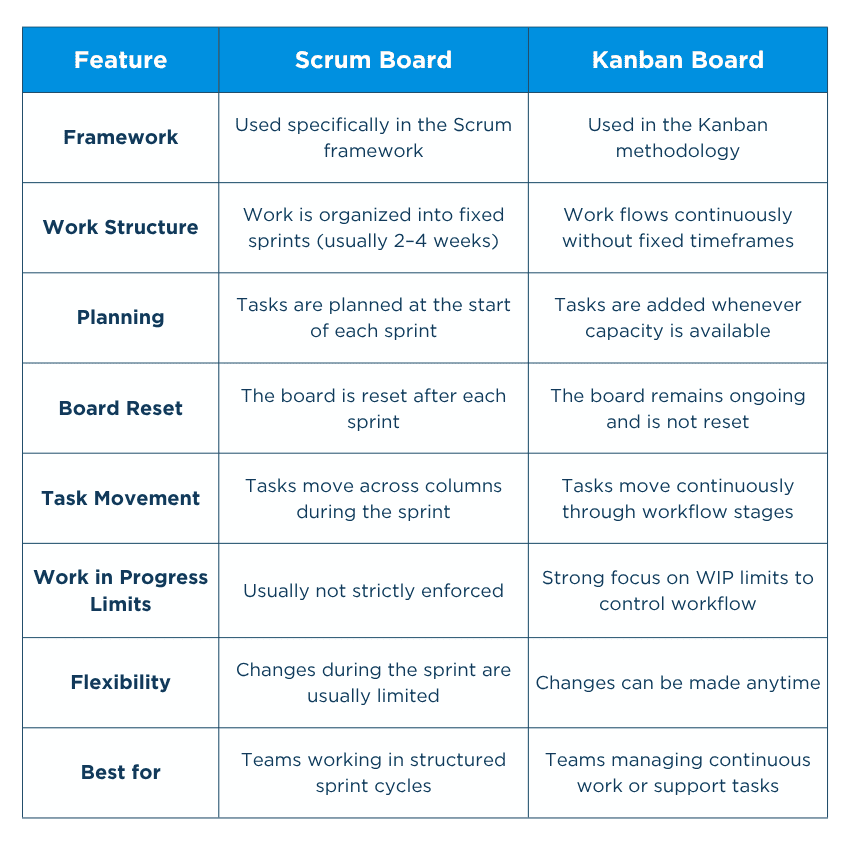
Scrum Boards and Kanban Boards are both visual tools used in Agile Project Management to track tasks and manage workflows. While they may look similar, they follow different principles and are used in different ways.
A Scrum Board is designed specifically for Scrum teams working within fixed sprints, which are short development cycles usually lasting two to four weeks. Tasks are planned at the beginning of the sprint, and the board is reset once the sprint is completed. The focus is on completing a defined set of tasks within a specific time period.
A Kanban Board, on the other hand, is used for continuous workflow management. There are no fixed sprints, and tasks are added or completed continuously. Kanban focuses on improving efficiency and maintaining a steady flow of work rather than completing tasks within a set time frame. Let's check their differences in detail with the table below:
Conclusion
A well-implemented Scrum Board can transform your team’s workflow, making it more transparent, collaborative, and efficient. By tailoring the board to your specific needs, you can guarantee that everyone stays aligned and focused on the sprint goals. Explore such boards and watch your team’s productivity soar!
Register for our Scrum Developer Certification and enhance your technical expertise in Agile environments!


 Back
Back

 Topics

 Courses


 10 Aug 2026

 David Walter