Are you still relying on spreadsheets to manage complex projects? There may be a better way. While spreadsheets are useful for basic task tracking, they become difficult to manage as projects grow and teams expand. Keeping track of deadlines, resources, and project updates across multiple files can slow down collaboration and increase the risk of errors.
Airtable in Project Management offers a smarter alternative. It combines the familiarity of a spreadsheet with the flexibility of a database, allowing teams to collaborate from a single platform. In this blog, we will discover what is Airtable, its key features, how to use Airtable for Project Management, and how it can help you manage projects more effectively. Let's dive in!
Understanding Airtable for Project Management
Airtable is a cloud-based Project Management platform that combines the simplicity of spreadsheets with the power of a database. It enables teams to organize tasks, manage project data, and create customized workflows that align with specific project requirements. Its flexible structure makes it suitable for projects of all sizes and complexities.
With multiple views such as Kanban, Calendar, and Timeline, Airtable provides clear visibility into project progress, deadlines, and team responsibilities. Its integrations with tools like Slack, Jira, and Google Calendar enhance collaboration, while automation features help streamline repetitive tasks and improve overall workflow efficiency.

Key Features of Airtable for Project Management
Airtable offers a range of features that simplify Project Management and improve team collaboration. Below are the key features that make Airtable a popular choice for managing projects:
1) Airtable Project Management Templates
Airtable is built with a variety of ready-to-use Project Management templates that help teams get started quickly. These templates are designed for different project types and can be customized to match specific workflows, project goals, and reporting requirements. This flexibility reduces setup time and ensures teams can build a system that aligns with their processes.
2) Multiple Project Views
Airtable provides multiple ways to visualize project data, making it easier to monitor progress and manage workloads. Teams can switch between several views such as Grid, Kanban, Calendar, Timeline, Gallery, and Form, depending on their needs. These views offer greater visibility into project schedules, task status, and resource allocation.
3) Storage and Data Management
Airtable combines spreadsheet simplicity with database functionality, allowing teams to organize large amounts of project information efficiently. Users can store records, attachments, documents, images, videos, and other project assets in one centralized location, helping maintain accurate and accessible project data.
4) Task Management Capabilities
Airtable enables teams to create tasks, assign responsibilities, set priorities, automate workflows, and track deadlines from a single platform. Task updates can be monitored in real time, ensuring accountability and helping teams stay aligned with project objectives. Features such as comments, attachments, and status tracking further support effective task execution.
5) Collaborative Workspace Features
Airtable supports team collaboration through shared workspaces where members can access, update, and discuss project information. Teams can assign different permission levels, add comments, mention colleagues, and collaborate on records, ensuring everyone stays informed while maintaining appropriate access controls.
6) Integration Options
Airtable integrates with a wide range of business and productivity tools, including Slack, Microsoft Teams, Google Workspace, Jira, Asana, and other Project Management platforms. It also offers Application Programming Interface (API) access and automation capabilities, enabling organizations to connect workflows, streamline data sharing, and improve operational efficiency.
Lead complex project initiatives with the
Program Management Professional (PgMP)® Certification Training
– Join now!
How to Use Airtable for Project Management?
Using Airtable for Project Management is simple once you understand its setup process. From creating a project base to organizing data, collaborating with team members, and sharing project information, each step helps build a structured and efficient workflow. Follow the steps below to set up and use Airtable for your projects:
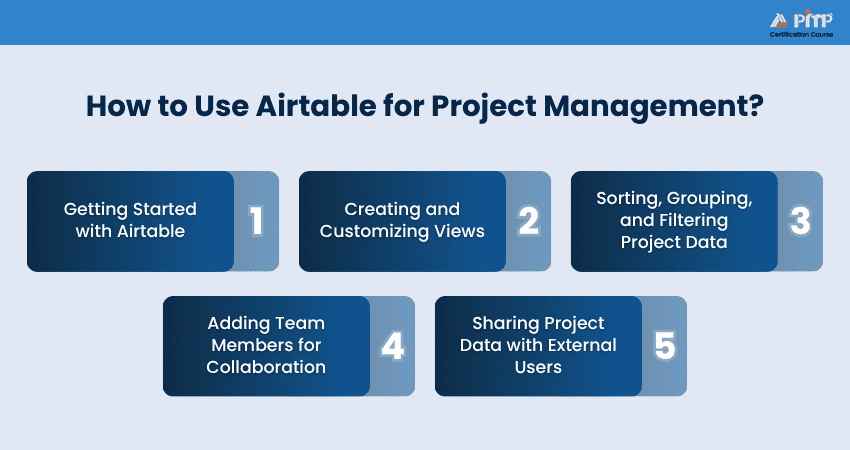
1) Getting Started with Airtable
Begin by creating a new Airtable base for your project or choosing a Project Management template to save time. Next, you can add tables, define fields such as task name, owner, priority, status, and due date, and organize your project information. Structuring your base correctly from the start makes it easier to manage tasks and monitor project progress.
2) Creating and Customizing Views
Once your project data has been added, you can create views to display project information in different formats that best suit your workflow. Switch between Grid, Kanban, Calendar, Timeline, or Gallery views depending on how you want to manage tasks. You can also customize each view by hiding unnecessary fields or displaying only the information needed for a specific project or team.
3) Sorting, Grouping, and Filtering Project Data
Now, you can organize your project records by sorting them according to due dates, priorities, or task owners. Group similar tasks by project stage, department, or assignee to improve visibility. You can also apply filters to focus only on active tasks, overdue work, or specific team members, making it easier to focus on current priorities, monitor progress, and identify bottlenecks.
4) Adding Team Members for Collaboration
To collaborate effectively, you can invite your team members to the Airtable workspace using their email addresses and assign appropriate access permissions. After that, you can allocate tasks, encourage team members to update progress, add comments, upload supporting files, and collaborate in real time. This keeps everyone informed and ensures project information stays up to date.
5) Sharing Project Data with External Users
When collaborating with clients, vendors, or stakeholders, use Airtable's sharing options to provide controlled access. You can share a view-only link, create a shared project view, or use forms to collect updates and information without giving external users full editing access to your workspace. Choose the appropriate sharing permissions to protect sensitive information while allowing others to access the details they need.
Begin your Project Manager career path with
PMI Project Management Ready® Certification Training
– Register now!
Pros and Cons of Airtable for Project Management
Like any Project Management tool, Airtable has both strengths and limitations. Its flexible database structure, customizable views, and automation features make it a powerful solution for many teams, but it may not meet every project's requirements. Understanding its pros and cons can help you determine whether Airtable is the right choice for your Project Management needs. So, below are the pros and cons of Airtable for Project Management:
Pros of Airtable for Project Management
Some pros of Airtable in Project Management are:
1) Highly Customizable Workflows:
Adapt bases, fields, and processes to suit different project types and business needs.
2) Multiple Project Views:
Switch between Grid, Kanban, Calendar, Timeline, and Gallery views for better project visibility.
3) User Friendly Interface:
Combines the familiarity of spreadsheets with powerful database capabilities, making adoption easier.
4) Strong Collaboration Features:
Enables teams to collaborate in real time through comments, notifications, and shared workspaces.
5) Automation Capabilities:
Reduces manual effort by automating repetitive tasks, notifications, and workflow actions.
6) Extensive Integration Options:
Connects with popular business tools to streamline communication and data management.
7) Centralized Information Management:
Stores project data, documents, and assets in a single, accessible location.
Cons of Airtable for Project Management
Some of the cons of Airtable for Project Management are mentioned below:
1) Limited Advanced Project Management Features:
May not provide the depth of resource planning and dependency management available in specialized Project Management tools.
2) Learning Curve for Advanced Functions:
Features such as linked databases, formulas, and automation can take time to master.
3) Pricing can Increase with Scale:
Costs may rise as team sizes, storage requirements, and feature needs grow.
4) Can Become Complex Over Time:
Highly customized bases may become difficult to manage without proper governance.
5) Reporting Capabilities Have Limitations:
Advanced reporting and analytics may require additional integrations or third-party tools.
6) Performance may be Affected by Large Databases:
Managing extensive datasets can occasionally impact usability and navigation.
7) Not Ideal for Every Enterprise Requirement:
Organizations with highly complex project portfolios may require more specialized solutions.
How to Evaluate and Score Project Management Tools?
To assess Project Management tools effectively, you need to evaluate them across several key criteria that reflect their functionality, usability, support, and overall value. Each category contributes a weighted percentage to the final score, providing a balanced view of the tool's strengths and limitations.
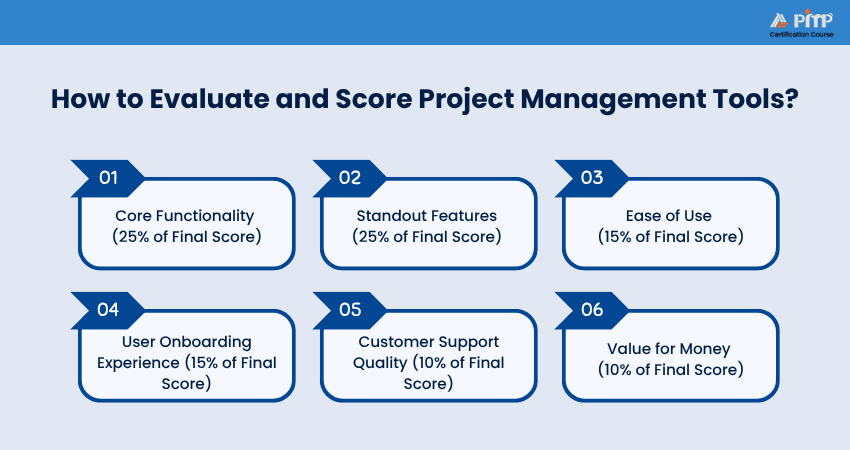
1) Core Functionality (25% of Final Score)
Core functionality measures how well a tool performs essential Project Management tasks. This includes task management, project planning, scheduling, collaboration, workflow tracking, reporting, and resource allocation. Tools that deliver reliable and comprehensive project management capabilities receive higher scores in this category.
2) Standout Features (25% of Final Score)
This category evaluates the unique capabilities that differentiate a tool from its competitors. Features such as workflow automation, advanced customization, integrations, AI-powered functionality, dashboards, and specialized project tracking tools can significantly enhance a platform's value and contribute to a higher score.
3) Ease of Use (15% of Final Score)
Ease of use assesses how intuitive and user-friendly the platform is for both new and experienced users. Factors include interface design, navigation, accessibility of features, and the overall learning curve required to use the tool effectively.
4) User Onboarding Experience (15% of Final Score)
A strong onboarding experience helps users become productive quickly. This evaluation considers setup processes, templates, guided tutorials, documentation, training resources, and other features that support smooth implementation and adoption across teams.
5) Customer Support Quality (10% of Final Score)
Customer support is assessed based on the availability, responsiveness, and effectiveness of assistance provided to users. Support channels such as live chat, email, knowledge bases, community forums, and training resources contribute to the overall evaluation.
6) Value for Money (10% of Final Score)
Value for money examines whether the features and functionality offered justify the cost of the platform. Factors such as pricing structure, scalability, included capabilities, and Return on Investment (ROI) are considered when determining the overall score.
Conclusion
Airtable for Project Management provides a flexible and intuitive approach to Project Management by combining the simplicity of spreadsheets with powerful database capabilities. From organizing tasks and managing project data to enabling collaboration and workflow automation, it offers teams a centralized platform for improving project visibility and efficiency. By understanding its features and applying the right setup strategies, organizations can use Airtable to streamline project delivery, enhance teamwork, and support better decision-making across projects.
Develop skills that drive success with the
Project Management Institute (PMI)® Certification Training
– Join now!


 Back
Back

 Topics

 Courses


 10 Aug 2026

 James Smith