Choosing the right Project Management tool is nothing short of picking the perfect co-pilot for your team's success. In the contest between Wrike vs Asana, both platforms promise streamlined workflows, better collaboration and boosted productivity; but which one truly delivers?
Whether you're managing complex projects or daily tasks, understanding these industry favorites' strengths and differences is key. So let's dive into the key Wrike vs Asana distinctions and help you decide which tool aligns best with your team's goals and working style.
Table of Contents
1) What is Wrike?
2) What is Asana?
3) Asana vs Wrike: Feature Comparison
4) Difference Between Wrike and Asana
5) Asana vs Wrike: Pros and Cons
6) Asana vs Wrike: Which One Should You Choose?
7) Conclusion
What is Wrike?
Wrike is an online Project Management tool that helps teams work together and manage their tasks effectively. It lets users plan projects, share updates, and keep track of deadlines, all in one place. With Wrike, teams can stay organized, streamline their workflow, and see their progress clearly.
This tool is great for businesses of all sizes because it makes teamwork easier. You can assign tasks, set priorities, and even chat with your team without switching apps. Wrike saves time, boosts productivity, and helps everyone stay on the same page.
Here are some key points to remember:
1) Founded in 2006:
Wrike was created by Andrew Filev to improve team collaboration and Project Management.
2) Headquartered in California:
Its main office is in San Jose, Silicon Valley.
3) Rapid Growth:
Wrike gained popularity for its user-friendly interface and robust features, becoming a leading Project Management tool.
4) Acquisition by Citrix:
In 2021, Wrike was acquired by Citrix to enhance its collaboration product offerings.

What is Asana?
Asana is a powerful tool designed to help teams stay organized and get work done. It allows you to create tasks and set deadlines for better planning. Teams can use it to prioritize work and make sure everything is completed on time.
This tool is ideal for keeping track of both small tasks and big projects. You can easily see what needs to be done, who is responsible, and when it's due. Asana helps improve teamwork and keeps everyone aligned towards their goals.
Key Points:
1) Founded in 2008:
Asana was created by Dustin Moskovitz and Justin Rosenstein, former Facebook employees, to make Work Management easier.
2) Launched in 2012:
The tool was officially launched to help teams manage tasks.
3) Headquartered in San Francisco:
Asana's main office is located in California's tech hub.
4) Continuous Growth:
Asana quickly became a popular choice for businesses, thanks to its simplicity and collaboration features.
Learn to manage projects with sustained accuracy in our
Asana Training
– Join today!
Asana vs Wrike: Feature Comparison
Asana and Wrike are both powerful Project Management tools, but they cater to different needs. Asana focuses on simplicity, Task Management, and team collaboration. It offers features such as task tracking, project timelines, boards, calendars, and workflow automation. Its intuitive interface makes it convinient for teams to adopt and manage projects efficiently.
Wrike offers more advanced Project Management capabilities, including detailed Resource Management, workload planning, custom workflows, Gantt charts, and comprehensive reporting tools. While it has a steeper learning curve than Asana, it is better suited for organizations managing complex projects, multiple teams, and large-scale project portfolios.
Difference Between Wrike and Asana
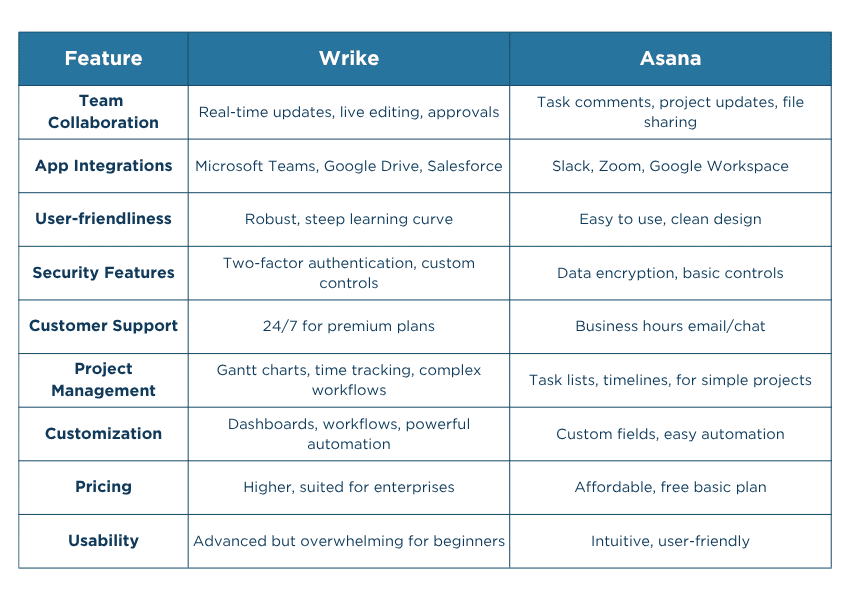
Here are the key differences between Wrike vs Asana:
1) Team Collaboration
Asana focuses on simplicity and ease of communication, making it easier for teams to collaborate without extensive training. Wrike offers more structured collaboration features, which can be beneficial for larger teams managing multiple projects and approval workflows simultaneously.
2) App Integrations
Asana integrates with a broad range of popular business applications, including communication, productivity, and cloud storage tools. Wrike also provides extensive integration capabilities and is particularly strong in enterprise environments where organizations rely on multiple software platforms.
3) User-friendliness
Asana is widely recognized for its intuitive interface and straightforward navigation. New users can typically begin managing projects with minimal onboarding. Wrike provides a broader range of features and configuration options, but this can result in a steeper learning curve for teams unfamiliar with advanced Project Management Software.
4) Security Features
Asana provides essential security controls suitable for most teams, while Wrike places a stronger emphasis on enterprise-grade security, governance, and administrative controls. This makes Wrike particularly attractive for larger organizations operating in regulated industries or managing sensitive business information.
5) Customer Support Availability
Asana primarily supports users through knowledge bases, community resources, and online support channels. Wrike provides a range of support options and often offers enhanced support services through higher-tier plans.
6) Project Management Capabilities
Asana is highly effective for managing day-to-day projects, task tracking, team coordination, and workflow visibility. Wrike offers more advanced Project Management capabilities, including detailed Resource Management, complex project structures, workload balancing, and sophisticated reporting.
7) Customization and Automation Options
Wrike offers extensive customization options, allowing organizations to tailor workflows, dashboards, request forms, and reporting structures to specific business processes. Asana provides customization and automation features as well, but its approach prioritizes simplicity and ease of use.
8) Pricing Structure and Value
Asana's pricing structure is often appealing to small and medium-sized teams looking for an accessible Project Management solution. Wrike may involve higher costs, particularly when advanced reporting, security, and customization features are required.
9) Overall Usability and User Experience
Asana delivers a clean, modern, and easy-to-navigate user experience that supports rapid adoption across teams. Wrike provides a feature-rich environment designed for comprehensive project oversight and operational control. While Asana emphasizes simplicity and accessibility, Wrike focuses on depth and scalability, making each platform suitable for different organizational requirements.
Learn to monitor project progress the ideal way with our
Basecamp Training
– Join today!
Asana vs Wrike: Pros and Cons
Now let's explore the significant benefits and drawbacks associated with the use of Wrike vs Asana:
1) Asana Pros
a) User-friendly Interface:
Asana offers a clean and intuitive workspace that makes it easy for teams to navigate projects, tasks, and workflows with minimal training.
b) Quick Adoption Across Teams:
Its low learning curve helps teams get started faster, reducing onboarding time and enabling immediate productivity.
c) AI-powered Productivity Features:
Built-in AI assists with creating projects, drafting updates, summarizing work, and automating routine tasks, helping teams work more efficiently.
d) Ready-to-Use Templates and Automation:
Pre-built templates and workflow automations simplify project setup, saving time and ensuring consistency across teams.
e) Built-in Team Collaboration:
Integrated messaging and communication features enable teams to collaborate directly within the platform, reducing reliance on external tools and keeping project discussions organized.
2) Asana Cons
Limited Task Ownership: Tasks can only be assigned to a single owner, which may create challenges when multiple teams or stakeholders share responsibility for the same work.
Basic Proofing and Review Features:
The proofing functionality supports limited file types, and feedback can become difficult to manage during larger review and approval processes.
Limited Support Channels:
Customer support primarily relies on help documentation and chat-based assistance, which may not be ideal for urgent or complex issues.
Restricted Workflow Flexibility:
As organizational processes become more complex, teams may find limitations in customization, approvals, and advanced Workflow Management.
Reporting and Automation Constraints:
Lower-tier plans offer basic reporting and limited automation capacity, which may not fully support the needs of larger or fast-growing teams.
3) Wrike pros
Highly Customizable Workflows:
Wrike allows teams to create tailored workflows, custom fields, and processes that align closely with their unique project requirements.
Advanced Project Planning and Visibility:
Multiple project views, including Gantt charts and Workload Management tools, provide detailed insight into timelines, resources, and project progress.
Powerful Reporting and Analytics:
Real-time reporting capabilities help teams monitor performance, track key metrics, and make informed decisions using up-to-date project data.
Strong Collaboration and Proofing Features:
Advanced proofing tools, real-time editing, and centralized feedback help teams collaborate efficiently on documents, designs, and other project assets.
Enterprise-ready Scalability and Integrations:
With extensive integration options and support for complex workflows, Wrike adapts well to growing teams and cross-functional collaboration needs.
4) Wrike cons
Steeper Learning Curve:
Wrike's extensive feature set and advanced capabilities can take time to learn, particularly for teams new to Project Management Software.
Greater Initial Setup Effort:
Configuring dashboards, workflows, custom fields, and automation rules often requires significant setup before teams can fully benefit from the platform.
Higher Costs for Advanced Features:
Many advanced reporting, security, and integration capabilities are available only on higher-tier plans, which can increase overall costs.
Complex User Interface:
The platform offers a large number of tools and options, which can make the interface feel overwhelming for users who prefer a simpler workspace.
May Be More Than Some Teams Need:
Smaller teams or organizations with straightforward project requirements may find Wrike's extensive functionality more complex than necessary for their needs.
Learn the tools that power successful projects in our
Project Management Tools Courses
- Sign up now!
Asana vs Wrike: Which one Should You Choose?
Both Asana and Wrike are powerful Project Management platforms, but they are designed for different types of teams and business needs. The ideal choice depends on your team's size, workflow complexity, and Project Management requirements. Here's how you choose between Wrike vs Asana:
Choose Asana if:
You are seeking a user-friendly and collaborative Project Management solution. Its intuitive interface, quick onboarding process, built-in communication features, and AI-powered productivity tools make it well-suited for startups, small businesses, and teams that want to get up and running quickly. It works particularly well for managing straightforward projects, marketing campaigns, and cross-functional collaboration without extensive setup.
Choose Wrike if:
You lead a larger organization and team managing complex projects. It offers deeper customization, advanced Workflow Management, detailed reporting capabilities, and stronger Resource Management features. Businesses with multiple departments, complex approval processes, or enterprise-level project requirements often benefit from Wrike's greater flexibility and control.
Final Verdict
There is no universal winner between Asana and Wrike. Asana stands out for its simplicity, ease of use, and fast adoption, making it an excellent choice for teams that prioritize collaboration and productivity. Wrike excels in customization, scalability, and advanced Project Management capabilities, making it a stronger option for organizations with more sophisticated workflow requirements.
Conclusion
In the end, choosing between Wrike vs Asana isn't about which tool is "better," but which one fits your team's rhythm. Wrike shines in structured, complex environments, while Asana thrives on simplicity and flexibility. Both bring powerful features to the table, so your decision depends on how you work. Pick the one that aligns with your goals, and watch your productivity transform into something truly remarkable.
Learn to create databases with our
Notion Training
– Join today!


 Back
Back

 Topics

 Courses


 10 Aug 2026
 Veronica Davis