Have you ever juggled multiple projects, each with its unique set of tasks, deadlines, and team members? If so, staying on top of everything without the right tools can quickly become a nightmare. That’s where Asana steps in. If you’ve ever found yourself asking, What is Asana and how it can help you manage your projects more efficiently, you’re in for a treat. But what exactly makes it stand out from the crowd?
In this blog, we’ll dive into What is Asana, explore its key features, break down how it works, and show you why it’s the go-to tool for effective Project Management. Ready to discover how Asana can revolutionize your workflow? Dive in to know more!
What is Asana?

Key Features of Asana
Asana is designed to streamline your workflow, ensuring that your team stays organized and productive. Here are some of its key features:
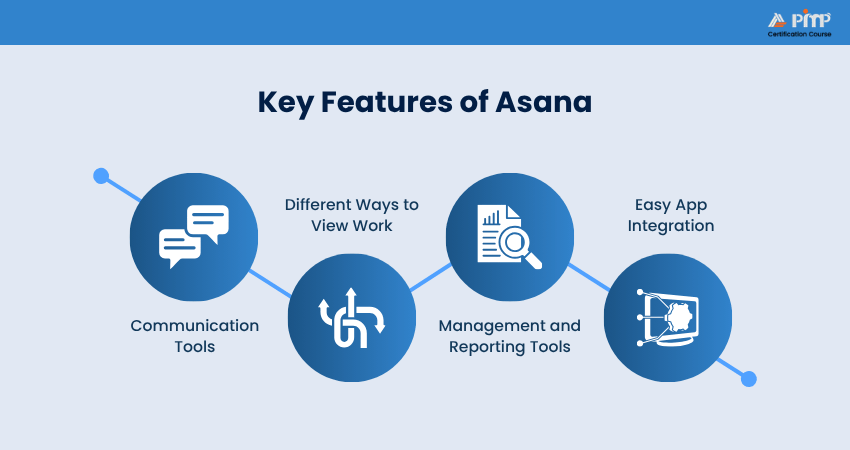
1) Communication Tools
Your inbox helps track all your messages and their associated tasks. You can attach tasks to messages and use project conversations to continue ongoing discussions. You can also proofread photographs and PDFs, turning any comments into tasks so that the rest of the team members know what needs to be fixed.
2) Different Ways to View Work
Asana provides flexible work views, including List for organized tasks, My Tasks for personal to-dos, Calendar for deadlines, Board for visual workflows, Inbox for conversations, and Files for easy access to all project documents.
3) Management and Reporting Tools
Asana's reporting tools make it easier to keep project updates organized and send reminders when needed. You can set “goals” to keep everyone aligned and “milestones” to motivate and encourage hard work.
Utilize status updates for projects and portfolios to communicate swiftly with your team and utilize your dashboard to check the status of all active projects and tasks at a glance, identifying any issue areas if necessary.
4) Easy App Integration
Asana's app integration simplifies its use. Several other apps also function well with Asana, including:
a) Communication:
Power BI, Microsoft Teams, Zoom, Outlook, Gmail, and
Slack
.
b) File Creation and Sharing:
Adobe Creative Cloud, OneDrive, Office365, Box, Google Drive, and Dropbox.
c) Time Tracking:
Harvest is an in-built time tracker tool
How Does Asana Work?
Asana is a strong tool designed to help teams manage their projects and tasks efficiently. Here’s a closer look at how Asana works:
1) Team Management Features
The Asana Project Management tool helps you plan, organize, and manage your team’s work from start to finish. You can coordinate team tasks, so everyone knows who’s doing what and share feedback, files, and status updates.
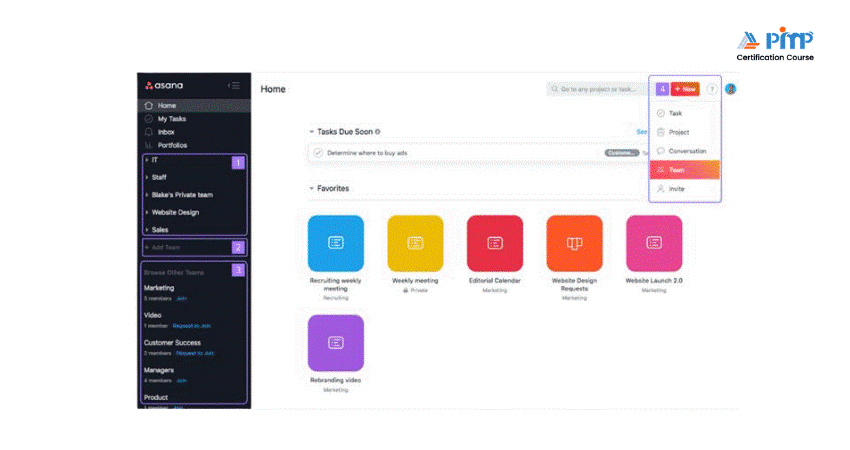
Here’s how you can handle your team members:
a) Teams:
Form teams to manage your projects and link all members through a unified calendar and discussions.
b) Followers:
Add organize team members as followers so that they stay updated with tasks and receive relevant notifications.
c) Guests:
Co-ordinate with vendors, contractors, and partners in Asana.
d) Permissions:
Use permissions to restrict access to any project, establish private teams for confidential work, and public teams for projects that need to be accessed by the entire organization.
e) Admin Controls:
Designate and assign control to others who can add, remove, and look after the organization along with their data and passwords.
2) Integration With Other Tools
Another advantage of using Asana is that you won’t need to abandon the tools you’re already familiar with. Asana can be integrated with these tools, making it easier to track your work and achieve results.
Asana offers numerous built-in integration options for file sharing through Google Drive, Dropbox, and Box. It integrates seamlessly with Adobe Creative Cloud, allowing you to assign new projects, access designs, and receive feedback from your team.
Other integration options include Microsoft Teams, Office 365, Outlook, OneDrive, Jira Cloud, Litmus, Salesforce, and more.
Transform your workflow by registering for our
Notion Training
- Book your spot now!
3) Communication Capabilities
Effective communication is key to better teamwork. With Asana’s team communication tools, you can manage your team’s work and ensure the right information is communicated at the right time.
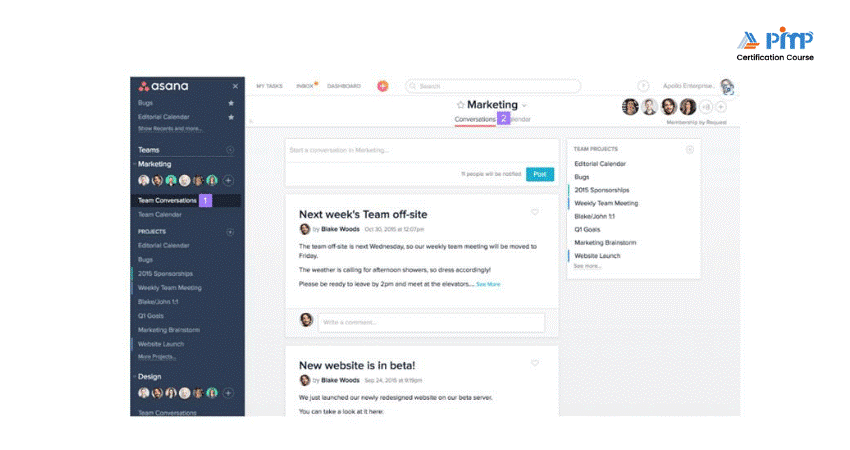
Here’s how you can achieve this:
a) Proofing:
Provide clear feedback by using task comments directly on images or PDFs, which will turn into tasks for easy tracking and assignment.
b) Project Conversations:
Talk about a project’s progress to keep a track of everything.
c) Team Pages:
Consolidate all your team’s projects in one place, have team conversations, make announcements, and describe your team.
d) Status Updates:
Share project status updates with stakeholders and build portfolios with this data.
e) Languages:
Team members can communicate in different languages, including French, English, Spanish, German, and Japanese.
f) Rich Text:
Utilize rich text in extensive text fields to clarify your message and structure your ideas with numbered and bulleted lists.
4) Various Project Views
To sort and filter your task list, use Asana Project Views. You can view tasks under 'Projects', 'My Tasks', and 'Search views'. Here are the available views:
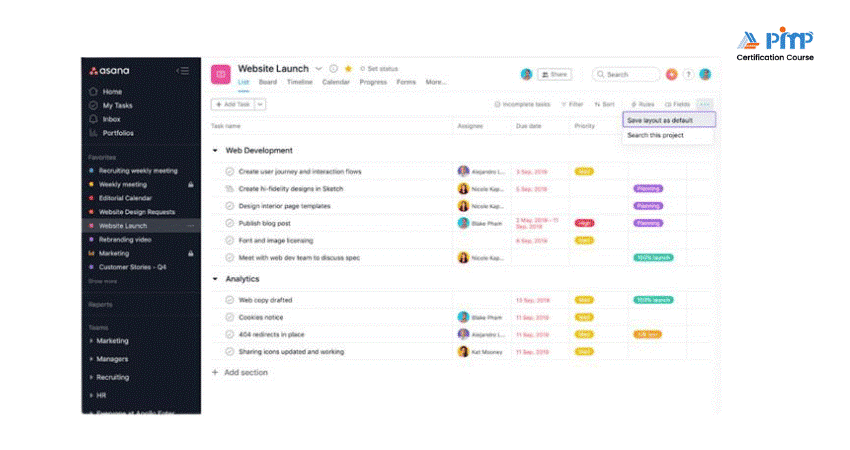
a) My Tasks:
Organize all your activities with a prioritized to-do list.
b) Inbox:
Get and filter notifications for your projects, conversations, and follow-up tasks.
c) List:
This grid-like format simplifies task creation, filtering, and formatting, enabling active team collaboration.
d) Search:
Locate the information you need to stay on top of all tasks necessary to achieve your goals.
e) Advanced Search Reports:
Generate advanced search reports to gain a clear overview of the progress of leads, prospects, and team members.
f) Portfolios:
Manage all your strategic initiatives and track the status of everything in one place.
g) Workload:
This resource management tool provides a single view of team capacity, aiding in staffing decisions and workload management.
h) Calendars:
View all your tasks on a calendar for a clear overview of your work.
i) Files View:
Access all project files in a gallery view with all attachments.
j) Color blind-Friendly:
Organize everything in Asana’s full-color palette using the color blind-friendly mode.
5) Project Management Tools
Asana as a
Project Management Tool
lets you organize and share all your projects as lists or boards, keeping records of all your initiatives, meetings, and programs.
Asana enables you to break down all your work into smaller tasks and additional strategies to prioritize entire tasks. You can look after all your tasks as follows:
a) Subtasks:
Break tasks into smaller parts or steps needed to complete the assigned task.
b) Task Assignees:
Assign tasks to different individuals to allocate roles and responsibilities accordingly.
c) Create Sections and Columns:
Group tasks into different sections or columns on a board to organize all your tasks and maintain your strategy.
d) Custom Fields:
Design custom fields such as drop-downs, numbers, or text for your projects and portfolios to organize, sort, or filter data. Additionally, you can set up notifications for all your custom fields.
e) Forms:
Capture details from your customers for project brief requests and more. Forms can be linked directly to your projects, allowing you to track submissions.
f) Due Time & Dates:
Assign due dates to every task to ensure completion within a specific timeframe. View all tasks on the Asana work calendar and specify due times to avoid missing deadlines, regardless of organizing zones.
g) Goals:
Set, track, and manage your goals to achieve milestones for leads, executives, and individuals.
h) Milestones:
Keep your team motivated and clarify goals by setting small tasks as key markers of progress.
i) Timeline:
Create a Gantt-style view of the task and project deadline so that the
Project Scheduling Process
can help better plan to achieve every milestone.
j) Attachments:
Upload files from your computer, Google Drive, OneDrive, Dropbox, and other sources.
k) Likes:
Acknowledge tasks or comments and provide feedback or vote for tasks using likes.
l) Assign Same Tasks in Multiple Projects:
Assign the same tasks in multiple projects to create workflows in different contexts.
m) Rules:
Create rules to automate manual processes, such as assigning tasks and updating required fields.
n) Approvals:
Request and approve work within the Asana system
Take your team collaboration to the next level with our
Slack Certification
– Join now!
How to Use Asana for Project Management?
By providing a clear structure and real-time updates, it ensures that your team remains organized and on track. Below are some of the key features that make Asana an effective Project Management solution:
1) Assign Tasks
The first step for any task is to create the terms of reference and assign responsibility. Use the Boards feature to break down a large project into smaller tasks. Add a task in the “To do” column and move it to the “Done” column once completed. You can map out the phases of a task's lifecycle and update information on the spot. With Asana for Project Management, no detail will escape you.
2) Create Custom Forms
To save time when creating tasks, set up a form that allows you to easily fill in the necessary information based on the task. With Asana for Project Management, you can create a form that clearly indicates the department it belongs to, the task's priority, and other relevant details.
3) Set Deadlines
You have assembled a collection of tasks and allocated them to various dashboards. You’ve also set up a form to provide details for upcoming tasks easily. Now, the next step is to set deadlines. Use the Timeline tool to fix a deadline date and set a start date for the upcoming task.
If you can’t start a task until a colleague finishes theirs, Timeline might display this on your schedule and help you set clear deadlines.
4) Track Progress by Date
Use the Calendar to gain an overview of daily activities. This will help you estimate the time required to achieve results and monitor the team’s workload.
5) Distribute Workload Efficiently
Use the Workload tool to see how busy each employee is. This will help you allocate tasks more accurately, ensuring your colleagues stay focused and avoid burnout. You’ll also be able to see who is available and know exactly who to assign to each project.
6) Monitor Project Progress on a Single Dashboard
Another distinctive feature of Asana Project Management software is its ability to monitor your workflow from various perspectives. With Universal Reporting, you can track which stage you are at and how long it will take to complete the project and identify any obstacles. This eliminates the need to ask, “How are we doing?” in general meetings.
Manage projects efficiently in real-world scenarios with our
Trello Training
– Register today!
Benefits of Using Asana
Asana Project Management tool offers several benefits that help teams work more efficiently and stay organized. Let's check some of those benefits:
1) Free Version
1) Can be used without paying anything
2) Suitable for individuals and small teams
3) Allows you to create and assign tasks easily
4) Helps organize daily work in one place
5) Good for trying the tool before upgrading
2) Integration
1) Works well with tools like Google Drive and Slack
2) Makes it easy to share files and updates
3) Saves time by reducing app switching
4) Keeps all work connected
5) Improves overall workflow
3) Collaboration
1) Allows team members to comment on tasks
2) Makes file sharing simple
3) Keeps discussions linked to work
4) Helps everyone stay informed
5) Reduces confusion and emails
4) Prioritization
1) Helps decide which tasks are most important
2) Allows setting deadlines for work
3) Makes it easier to plan tasks
4) Keeps work organized
5) Helps teams focus better
5) Security
1) Keeps your data safe and protected
2) Controls who can see or edit work
3) Protects sensitive information
4) Uses secure login methods
5) Helps maintain privacy
Limitations of Using Asana
Though the Asana Project Management tool is beneficial to several teams, it has some limitations that teams should consider. They include:
1) Limited Gantt Functionality
1) Timeline is not a full Gantt chart
2) Limited support for complex task links
3) Not suitable for detailed scheduling
2) Hard to Use
1) Takes time to learn for beginners
2) Interface may feel confusing at first
3) Needs proper setup to work smoothly
3) Expensive
1) Many useful features are paid versions
2) Costs increase with more users
3) May not suit small budgets
4) Lacks Time Tracking
1) No built-in time tracking
2) Requires extra tools to track time
3) Adds extra work for teams
5) Can’t Handle Complexity
1) Not ideal for very complex projects
2) Limited advanced planning features
3) Better for simple or medium projects
Conclusion
Asana stands out as a reliable Project Management tool that helps teams bring structure, clarity, and focus to their work. With a clear knowledge of What is Asana, its wide range of features, from task organization and collaboration to integrations and progress tracking, you can easily manage everyday tasks as well as larger projects.
Build practical Project Management skills with our
Project Management Tools Courses
– Explore now!


 Back
Back

 Topics

 Courses


 10 Aug 2026

 David Walter