Choosing the right Project Management tool can shape how efficiently your team plans, collaborates, and delivers results. In the debate of Jira vs Trello, both platforms offer powerful ways to organize work, but serve different needs. One path lined with colorful digital sticky notes, the other powered by deep technical structure.This blog will explore their features, costs, and unique benefits to help you choose the right tool for your team in the final "Jira vs Trello" showdown. Let's explore their secrets!
Understanding their strengths and weaknesses can help with deciding which tool aligns best with your projects, team structure and long-term goals. In this blog, we’ll break down the strengths, quirks and ideal use cases of Jira vs Trello to help you pick your perfect match. So read on!
Jira vs Trello: An Overview
Jira and Trello are the two of the most popular
Project Management Tools
. For many professionals, they may seem similar. Even in many cases, they are used interchangeably. However, taking a broader perspective, there is a significant difference between them. Jira is primarily useful for projects that involve complex Software Development projects and those that follow Agile Methodologies.
In contrast, is a more flexible and broader-range Project Management tool that can be used for various levels of tasks, ranging from small to large. You can think of their differences as the relationship between a car and a mini van. Jira is similar to a sports car, good for quick, focused trips, while Trello resembles a family mini van, capable of handling a variety of tasks with ease.

What is Trello?
Trello is a Cloud-based Project Management platform based on Kanban-style boards. It organizes work into boards, lists and cards, thus allowing teams to track tasks visually and manage progress with ease. Each card can include checklists, attachments, due dates and comments to support real-time collaboration. Trello also integrates with calendars, messaging platforms and document tools.
What are the Key Features of Trello?
Here are the exciting features of Trello:
a) Visual Boards:
Trello uses Kanban-style boards where the tasks appear as cards arranged in lists. Users can personalize boards with backgrounds, labels, colors and stickers to reflect priorities. Boards can also be duplicated or archived for future reference or reuse.
b) Drag-and-Drop Interface:
Cards can be easily moved between lists using a simple drag-and-drop action. This feature helps teams quickly adjust their priorities, sort cards by due date and rearrange lists as projects evolve.
c) Power-ups:
Power-Ups are integrations and add-ons that boost functionality without leaving the board. These include calendar views, custom fields, voting options and integrations with powerful tools like Google Drive and Slack.
d) Automation (Butler):
Butler is Trello’s built-in automation tool for managing repetitive tasks. Teams can set rules to move cards, assign members, automatically apply labels or trigger reminders.
e) Collaboration Tools:
Trello enables teams to collaborate directly within cards through comments, mentions, file attachments and due dates. Users can attach documents, share images and tag colleagues.
What is Jira?
Jira is a powerful project tracking platform developed by Atlassian. It's designed primarily for Software Development and IT teams. It supports Agile Project Management through customizable Scrum and Kanban boards, backlog refinement, sprint planning and release tracking.
What are the Key Features of Jira?
Here are the main features of Jira:
a) Custom Workflows:
Jira workflows allow teams to define the full lifecycle of an issue with configurable statuses, transitions, conditions, validators and automated actions. Organizations can apply workflow schemes across multiple projects for consistency.
b) Agile Boards:
Jira provides Scrum and Kanban boards that help Agile teams plan backlogs, organize sprints and monitor progress visually. Features such as swim lanes, and work-in-progress limits help teams manage workloads.
c) Advanced Reporting:
Jira includes detailed reporting tools like burndown charts, control charts, cumulative flow diagrams and sprint reports. These insights help teams identify bottlenecks and track project health through customizable dashboards.
d) Issue Types and Hierarchies:
Jira supports different issue types including epics, stories, tasks, and sub-tasks. These structures help link related tasks, manage dependencies and analyze progress across projects using advanced search and filters.
e) Security and Permissions:
Jira offers detailed access controls through configurable permission schemes. Teams can assign roles, restrict issue visibility and manage project-level permissions.
Jira vs Trello: Key Differences
Any professional needs to have a thorough knowledge of these two vital Project Management tools. This will help you to streamline your project-related work easily. Below, we have illustrated these differences in detail:
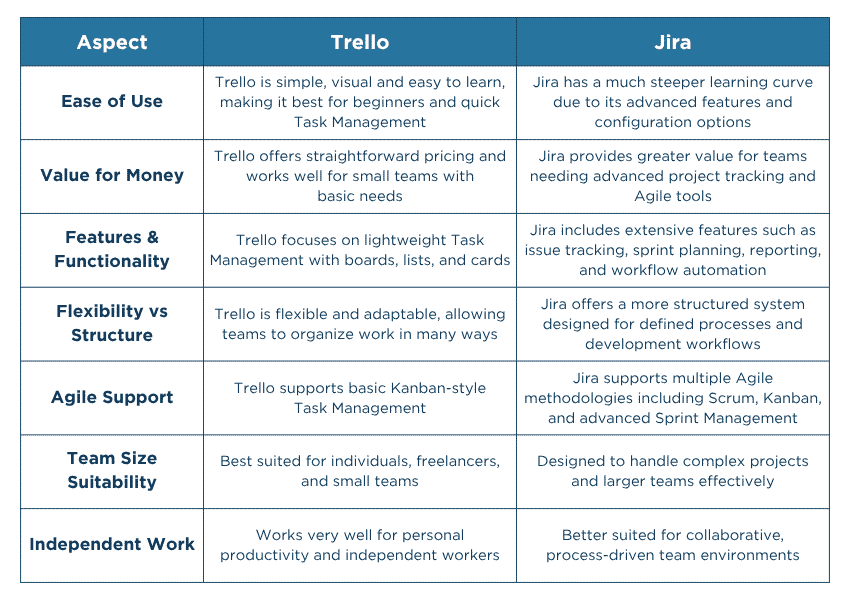
1) Trello is Easier to Use Than Jira
a) Trello:
Trello is more user-friendly and has an interactive visual interface compared to Jira. It enables quick setup and immediate use. This speciality makes it highly user-accessible, requiring minimal technical expertise.
b) Jira:
While offering a comprehensive suite of features, Jira presents a steeper learning curve, requiring users to familiarize themselves with its workflows and terminology. This complexity can be advantageous for intricate Project Management but may pose challenges for new users.
2) Jira Is Better Value Than Trello
a) Jira:
For teams requiring advanced Project Management capabilities, detailed reporting, and Agile support, Jira's pricing is justified by its extensive feature set.
b) Trello:
Trello offers excellent value for teams seeking a straightforward, flexible tool without the need for advanced functionalities, along with affordable pricing tiers that scale with additional features. However, it lacks advanced tools like data visualization and Gantt charts, which can be found in Jira’s free plan.
3) Jira Is More Functional, With More Features Than Trello
a) Jira:
Jira is ideal for teams managing complex projects that require detailed tracking, Time Management, task linking, and clear data visualization; Jira’s feature-rich platform justifies its pricing, especially for those needing advanced functionalities.
b) Trello:
Trello provides great value for smaller or less complex projects. It focuses on simplicity and flexibility with an easy-to-use interface and visual boards. It’s an ideal choice for teams that do not require advanced features like time-tracking or task dependencies, with affordable pricing that scales with additional features.
Become an Asana expert in task dependencies and Timeline Management- Join our
Asana Training
today!
4) Trello Is More Flexible; Jira Offers More Structure
a) Trello:
Trello is a user-friendly tool designed for straightforward task tracking and project progress using a basic Kanban Board and card-based system. It is ideal for teams needing simplicity without advanced functionalities like automation or task prioritization.
b) Jira:
Jira is a robust platform offering advanced features for complex Issues Management, such as automation, Workflow Management, and high customization. Jira allows teams to track progress, prioritize tasks, and integrate with other Project Management tools, making it the go-to choice for more intricate project needs.
5) Jira Offers Different Agile Ways of Working
a) Jira:
Jira is equipped with a Scrum framework, which helps teams organize their work into short, structured sprints, enabling Task Management, progress tracking, and iteration. While it may seem confusing for teams not using Scrum, it’s an essential tool for developers looking for a structured, iterative approach to work.
b) Trello:
Trello offers a flexible Kanban-style system that allows teams to visually organize tasks and create custom workflows. Though it lacks a built-in Scrum framework or detailed tracking like Jira, its simplicity and adaptability make it ideal for teams that want to customize their processes without the complexity of Scrum.
6) Jira is Better Than Trello for Large Teams
a) Trello:
Trello is an excellent choice for a simple and flexible team. It is easy to use and can be set up for Task Management quickly. However, its advanced features limit its effectiveness for larger, more complex teams requiring extensive functionality.
b) Jira:
Jira offers comprehensive features, especially on its Enterprise plan, tailored for large organizations. This includes advanced security controls, user management, in-depth Data Analytics, and 24/7 support. These capabilities make Jira the team’s ideal solution, which requires powerful tools for effective
Project Management
.
7) Trello Is Better Than Jira for Independent Workers
a) Trello:
Trello is ideal for independently working freelancers. It offers an unlimited personal board with unlimited personal boards and supports up to 10 team boards for colleagues or clients’ collaboration with colleagues or clients. Its simplicity and effectiveness make it a great choice for freelancers who need a straightforward tool to manage tasks and projects.
b) Jira:
Jira is better suited for large and more complex teams. Its extensive attributes and settings may be overwhelming for solo freelancers, who often don’t require its advanced tools. In addition, its user-friendliness and less intimidating interface make it more freelancer-practical for those who require a simple, efficient way for their work organization.
Upgrade your workflow and learn the platforms that power world‑class teams. Sign up for our
Project Management Tools Courses
now!
Jira vs Trello: Pricing
Here are the pricing and features for Jira and Trello plans, which cater to a variety of user needs. The table below outlines the cost, storage, and available support options for each plan.

Benefits and Drawbacks of Jira
Here are the benefits of using Jira:
a) Powerful Agile Capabilities:
Jira provides strong tools designed to support Agile Project Management, making it easier for teams to plan and track work efficiently.
b) Customizable Workflows:
The platform allows teams to create and adjust workflows to match their specific processes and project requirements.
c) Atlassian Ecosystem Integration:
Jira integrates smoothly with other Atlassian products, helping teams manage documentation and collaboration in one connected environment.
d) Strong Reporting and Analytics:
It offers detailed reporting features and analytics that help teams monitor performance, track progress, and identify potential issues.
Here are the cons of Jira:
a) Steep Learning Curve:
Jira can be challenging for new users, especially those unfamiliar with Agile tools or advanced Project Management platforms.
b) Overly Complex for Small Projects:
The platform may feel excessive for smaller teams or projects that do not require advanced tracking.
c) Complex Configuration:
Setting up workflows, permissions, and project structures can require time and technical understanding.
Master Notion’s powerful database and Project Management features – Register for our
Notion Training
today!
Benefits and Drawbacks of Trello
Here are the benefits of using Trello:
a) Simple and Intuitive Interface:
Trello is easy to use, with a visual layout that helps teams organize tasks quickly.
b) Integration With Popular Tools:
The platform connects with a wide range of applications and services for better workflow and collaboration.
c) Well Suited for small teams:
Trello works particularly well for small teams or simple projects that require straightforward Task Management.
d) Free Plan Available:
A free version is available, thus allowing individuals and teams to start using the tool without initial costs.
These are the drawbacks of using Trello:
a) Limited for Complex Projects:
Trello may not provide enough advanced features for managing large or highly complex projects.
b) Lack of Advanced Analytics:
Compared with more sophisticated tools, Trello offers limited reporting and analytics capabilities.
Who Should Use Trello and Jira?
Choosing between Trello and Jira depends on the size and complexity of the teams or projects. While Trello is designed for simplicity and smaller teams, Jira caters to advanced feature-driven, larger, more complex projects. Let’s dive into who benefits most from each platform.
1) Trello Users
Trello is perfect for the following groups:
a) Small Teams:
If you have a small team and don’t need advanced Project Management features, Trello offers seamless tasks collaboration and management.
b) Freelancers:
Freelancers benefit from Trello’s simplicity, as they can organize client work, personal projects, and deadlines in one place.
c) Creative Teams:
Designers, marketers, or content creators can use Trello for their creative process tracking without the complicated Project Management Systems (PMS).
d) Non-technical Teams:
Trello is ideal for non-technical teams who need a simple and flexible Task Management System (TMS).
2) Jira Users
Jira is better suited for:
a) Software Development Teams:
Agile methodologies-driven (Scrum, Kanban, etc.) teams benefit from Jira’s tailored features. These include sprint planning, issue tracking, and Backlog Management.
b) Large Teams
: Jira’s robust reporting and tracking tools make it a proper choice for larger teams with complex workflows and multiple moving parts.
c) Teams Requiring Detailed Reporting:
If your team needs to generate detailed reports on project progress, issue resolution, and resource allocation, Jira offers powerful analytics tools.
d) Companies Using DevOps Tools:
If your company uses Bitbucket or GitHub, Jira can integrate seamlessly with these platforms. This makes it an excellent choice for teams involved in Software Development.
Learn advanced Basecamp features for efficient Project Tracking- Gear up for your career-advancement
Basecamp Training
!
Top Alternatives of Trello and Jira
If neither Trello nor Jira fits your needs, there are plenty of alternatives to consider:
a) Asana:
As a flexible Project Management tool, Asana offers tracking of tasks, project timelines, and team collaboration features. It’s ideal for both small and large teams.
b) Monday.com:
Monday.com provides a visual Project Management interface with various templates for different workflows. It’s suitable for teams looking for flexibility with the option to scale up as needed.
c) ClickUp:
ClickUp offers a mix of Task Management and collaboration tools with customizable features suitable for both small and large teams.
d) Basecamp:
Basecamp focuses on simplicity and ease of use, providing collaboration features like file sharing, messaging, and to-do lists. It’s suitable for teams that need to stay organized without too many bells and whistles.
Master Notion’s powerful database and Project Management features – Register for our
Notion Training
today!
Conclusion
Choosing between Jira and Trello comes down to your project’s complexity and your team’s needs. As explained in this blog, Jira is ideal for managing detailed workflows and advanced features, while Trello excels at simple, visual collaboration. Assess your needs, try both and choose the one that empowers your team to achieve its best!
Learn to automate workflows with Airtable’s robust integrations- Join our
Airtable Training
now!


 Back
Back

 Topics

 Courses


 10 Aug 2026
 David Walter